<?xml version="1.0" encoding="utf-8"?><feed xmlns="http://www.w3.org/2005/Atom" ><generator uri="https://jekyllrb.com/" version="4.4.1">Jekyll</generator><link href="https://kevinsmall.dev/feed.xml" rel="self" type="application/atom+xml" /><link href="https://kevinsmall.dev/" rel="alternate" type="text/html" /><updated>2026-06-11T13:24:12+00:00</updated><id>https://kevinsmall.dev/feed.xml</id><title type="html">Kevin Small</title><subtitle>Blockchain Systems • Solidity • DeFi • Architecture</subtitle><entry><title type="html">Smart Contract Security Is Not a Code Problem</title><link href="https://kevinsmall.dev/web3/smart-contract-security-not-a-code-problem/" rel="alternate" type="text/html" title="Smart Contract Security Is Not a Code Problem" /><published>2026-05-04T00:00:00+00:00</published><updated>2026-05-05T12:20:10+00:00</updated><id>https://kevinsmall.dev/web3/smart-contract-security-not-a-code-problem</id><content type="html" xml:base="https://kevinsmall.dev/web3/smart-contract-security-not-a-code-problem/"><![CDATA[<p>When people talk about smart contract security, they often think of things like code quality and audits. In this post I propose that individual Solidity code faults are, in 2026, largely a solved problem. What is less solved, and considerably more dangerous, is everything else. Smart contract risk is layered, and the layers above the code are where the serious problems still lie.</p>

<p>This post maps out four layers of vulnerability: <strong>code-level</strong>, <strong>composability-level</strong>, <strong>human-level</strong>, and <strong>external</strong>. Each has its own threat model, its own mitigations, and its own failure modes. The transitions between the levels are often fuzzy and overlapping, and sophisticated attacks span multiple layers. The core point of this post is that code is not the most important layer any more.</p>

<p>There are excellent resources for code-level and composability-level vulnerabilities. The <a href="https://owasp.org/www-project-smart-contract-top-10/">OWASP Smart Contract Top 10</a> shows what vulnerabilities have been fashionable over the last couple of years. The Ethereum Enterprise Alliance <a href="https://entethalliance.org/specs/ethtrust-sl/">has a useful specification</a> outlining security considerations that should be made for smart contracts. These are useful but are not the full story. Let’s walk through the four layers of vulnerability.</p>

<figure class="">
  
    <a href="/assets/images/posts/smart-contract-security-not-a-code-problem-1.jpg" class="image-popup">
      <img src="/assets/images/posts/smart-contract-security-not-a-code-problem-1.jpg" alt="Manual disassembly" />
    </a>
  <figcaption>
      I knew we should have used a better auditor

    </figcaption></figure>

<h1 id="1-code-level-vulnerabilities">1. Code-level Vulnerabilities</h1>

<p>The bugs that can live inside a single contract are well-understood, well-documented, and increasingly well-mitigated. Developers, auditors, and tooling are all better than they were when Ethereum launched.</p>

<p><strong>Reentrancy</strong> is a classic. A contract calls out to an external address before updating its own state, and the external address calls back in before the first execution completes. The result is that the contract’s state is stale during the callback, which can cause havoc. The fixes (checks-effects-interactions, mutexes) are standard practice.</p>

<p><strong>Over- and underflows</strong> were a serious hazard in Solidity before <code class="language-plaintext highlighter-rouge">0.8.0</code>, when arithmetic silently wrapped around. A balance that should have reached zero would instead wrap to <code class="language-plaintext highlighter-rouge">2^256</code>. <a href="https://www.openzeppelin.com/contracts">OpenZeppelin</a>’s <code class="language-plaintext highlighter-rouge">SafeMath</code> library was the canonical fix. Solidity <code class="language-plaintext highlighter-rouge">0.8.0</code> made <code class="language-plaintext highlighter-rouge">SafeMath</code> unnecessary here by building in overflow checks.</p>

<p><strong>Poor access control</strong> covers a broad category. Functions that should be owner-only but are not, admin roles that are never revoked, initialiser functions left callable after deployment. A missing <code class="language-plaintext highlighter-rouge">onlyOwner</code> modifier is embarrassingly simple to overlook and has cost projects millions.</p>

<p><strong>Unbounded loops</strong> do not steal funds directly, but they can make a contract permanently non-functional. A loop that iterates over a list that grows with usage will eventually hit the block gas limit and brick the contract.</p>

<p><strong>Delegate calls to untrusted contracts</strong> are a subtler hazard. <code class="language-plaintext highlighter-rouge">delegatecall</code> executes foreign code in the context of the calling contract’s storage. If the logic contract is upgradeable or untrusted, the storage layout can be corrupted or overwritten entirely.</p>

<h2 id="mitigations-at-this-layer">Mitigations at this layer</h2>
<p>The good news is that these vulnerabilities are pretty much solved by good engineering discipline today. Contract libraries such as OpenZeppelin and <a href="https://github.com/Vectorized/solady">Solady</a> provide battle-tested implementations of common patterns, Hardhat and Foundry make testing straightforward. There are mature static analysis tools and there is an excellent audit industry. Bug bounty programmes and the opportunity to buy exploit insurance provide a backstop. None of this is perfect, but code-level issues are far less likely to surprise a careful team than they were even five years ago.</p>

<p>What <em>is</em> perfect, within its limited scope, is formal verification. For teams that need the highest assurance, formal verification tools such as <a href="https://github.com/a16z/halmos">Halmos</a> can mathematically prove that code invariants hold across every possible function input. They require significant additional effort but deliver mathematical certainty.</p>

<h1 id="2-composability-level-vulnerabilities">2. Composability-level Vulnerabilities</h1>

<p>This layer is where contracts call other contracts, either within a single protocol or across the wider DeFi ecosystem. Composability creates risk. When protocols call other protocols, and those protocols call yet others, the attack surface is not a single contract. It is a graph of interacting systems with emergent behaviour that no single audit can capture easily.</p>

<p><strong>Sandwich attacks</strong> exploit the fact that the public mempool is, well… public. An attacker sees your pending swap transaction, places a buy order immediately before it (pushing the price up), lets your transaction execute at a worse price, then sells immediately after. The attacker profits from the price impact your trade creates.</p>

<p><strong>Oracle manipulation</strong> is a very popular attack. Protocols that rely on on-chain price feeds, particularly those using DEX spot prices, are vulnerable to attackers temporarily distorting the price through a large trade or flash loan. The protocol reads the manipulated price and makes decisions (lending, liquidation thresholds) based on bad data. Time-weighted average prices and multi-source aggregation are the standard defences.</p>

<p><strong>MEV (<del>Miner</del> <del>Maximal</del> Maliciously Extractable Value)</strong> is where block proposers can reorder, insert, or censor transactions within a block. At the benign end this is arbitrage. At the hostile end it is front-running and sandwich attacks at scale.</p>

<p><strong>Whale-controlled governance</strong> is a governance-layer risk. When token voting determines protocol upgrades, a sufficiently large holder, or a coalition, can pass proposals that benefit themselves at the expense of other users.</p>

<h2 id="mitigations-at-this-layer-1">Mitigations at this layer</h2>

<p>Fuzzing tools (<a href="https://github.com/crytic/echidna">Echidna</a>, <a href="https://github.com/crytic/medusa">Medusa</a>) catch emergent state violations that unit tests miss. <a href="https://book.getfoundry.sh/forge/invariant-testing">Foundry</a> also has invariant fuzzing built in, making it accessible if you are already using it for testing. Threat modelling (sitting down and systematically asking “what can an adversary do if they control this input?”) is a valuable technique. Audits can focus on contract interactions, not just the safety of single contracts. Bug bounties provide mitigation in this layer too. To avoid sandwich attacks and MEV, there is the option to not use the public mempool, and instead use MEV Blocker services, essentially private mempools.</p>

<p>As protocols become more cross-chain and more deeply composed, this layer gets harder, not easier.</p>

<h1 id="3-human-level-vulnerabilities">3. Human-level Vulnerabilities</h1>

<p>This layer covers human and operational risk. Where the previous layers involve code and systems, this one is about the people who design, build, deploy, and run the protocol and the processes around them.</p>

<p><strong>OpSec failures</strong> around process approvals and key management are a consistent source of trouble. Lost keys, compromised keys, keys that were “just temporarily” on a hot machine. For any meaningful treasury, keys should not exist on any networked device, and changes should not require approval from a single signatory (as <a href="https://rekt.news/wasabi-protocol-rekt">Wasabi Protocol</a> demonstrated recently). <a href="https://www.fireblocks.com/">Fireblocks</a> and other institutional-grade wallet and multi-signature solutions provide significant protection (as <a href="/web3/fireblocks-101/">explained in an earlier post</a>).</p>

<p><strong>Phishing and social engineering</strong> targeting team members, particularly those with signing authority, are increasingly sophisticated. Attackers research their targets, spoof credible communications, and create urgency. Bybit is a high-profile case that involved multiple vulnerability types, including social engineering and a supply-chain attack. <a href="https://www.nccgroup.com/research/in-depth-technical-analysis-of-the-bybit-hack/">NCC Group’s technical post-mortem</a> is a thorough account of how it unfolded.</p>

<p><strong>Faulty business logic</strong> is hard to catch in testing. Imagine a system built to deliver certain business logic, and that business logic is fundamentally wrong, say a pricing algorithm. All your tests will pass as green to successfully show you’re delivering that business logic, but that business logic is not correct.</p>

<p><strong>Corruption and coercion</strong> are real risks for projects that are sufficiently valuable and whose key holders are publicly known. The “wrench attack” is not just a meme.</p>

<p><strong>Poor audit processes</strong> are common. Projects skip audits due to cost or timeline pressure, audit only part of their codebase, or add “tiny fixes” to the audited code and put that amended code live instead. Contracts that are out of scope (multisigs, bridges, peripheral contracts) are often where the actual exploit lands.</p>

<p><strong>Launch-targeted scams</strong> consistently target the moment of maximum attention: token launches, high-profile protocol announcements, airdrops. The larger the event, the more sophisticated the social engineering campaign surrounding it.</p>

<p><strong>Hiring practices</strong> matter more than they might appear. A team with good security instincts, appropriate scepticism about unusual requests, and a clear understanding of what signing authority means is a different proposition from one without. Avoid recruiting from the <a href="https://www.wiz.io/blog/north-korean-tradertraitor-crypto-heist">TraderTraitor</a> alumni network, even though they are clearly very skilled.</p>

<p><strong>Address poisoning</strong> deserves a mention. An attacker sends tokens from a carefully crafted address that resembles a known address (matching prefix and suffix) with the goal of polluting your transaction history. When you next go to copy an address from your history, you select the poisoned one. I wrote about this in <a href="/web3/address-poison/">an earlier post</a>.</p>

<h2 id="mitigations-at-this-layer-2">Mitigations at this layer</h2>

<p>Hardware wallets and a good quality multi-signature approval process for transaction signing. Security training for the whole team, not just engineers. Thorough audit scoping. If you have processes involving bridges, they are in audit scope. Response readiness matters here too: drills, documented incident response runbooks, and relationships with legal counsel. <a href="https://securityalliance.org/our-work/seal-911">SEAL-911</a> is a free, round-the-clock emergency hotline staffed by vetted white-hat security researchers.</p>

<h1 id="4-external-vulnerabilities">4. External Vulnerabilities</h1>

<p>The final layer covers risks that originate outside your project, outside your immediate control, yet can still destroy your protocol.</p>

<p><strong>Stablecoin depeg or collapse</strong> is a real thing. <a href="https://corpgov.law.harvard.edu/2023/05/22/anatomy-of-a-run-the-terra-luna-crash/">Terra/LUNA</a> showed that foundational DeFi infrastructure can simply stop existing, and every protocol depending on it goes with it. Protocols built on top of stablecoins inherit that counterparty risk.</p>

<p><strong>Supply-chain attacks</strong> target the developer toolchain itself: npm packages, build scripts, CI/CD pipelines, compromised dependencies. An attacker who can modify your build artefact before deployment wins regardless of how good your Solidity is. The <a href="https://www.chainalysis.com/blog/kelpdao-bridge-exploit-april-2026/">KelpDAO exploit</a> in April 2026, in which attackers replaced go-ethereum node binaries to approve a fraudulent cross-chain transfer, is a recent example of this class.</p>

<p><strong>Nation-state and advanced persistent threats</strong> are no longer theoretical. Nation-state actors have pulled off multi-stage attacks combining technical exploits with social engineering, and the resources behind them are substantial.</p>

<p><strong>Reputational risk</strong> is technically external but practically devastating. An exploit, even one from which funds are fully recovered, can permanently damage the credibility of a protocol. Recovery speed and communication quality matter as much as the technical response.</p>

<h2 id="mitigations-at-this-layer-3">Mitigations at this layer</h2>

<p>On-chain monitoring (<a href="https://www.hypernative.io/">Hypernative</a>, <a href="https://forta.org/">Forta</a>, and similar) can catch anomalous behaviour early enough to pause contracts before an exploit completes. Secure development practices throughout the supply chain (dependency pinning, reproducible builds, CI artefact signing) reduce the surface for supply-chain compromise. Response readiness: drills, pre-agreed pause procedures, relationships with exchanges and other protocols for coordinated response.</p>

<hr />

<h1 id="the-takeaway">The Takeaway</h1>

<p>Smart contract vulnerabilities are not a single problem. They are four overlapping problems:</p>

<table>
  <thead>
    <tr>
      <th>Layer</th>
      <th>Character</th>
      <th>Primary mitigations</th>
    </tr>
  </thead>
  <tbody>
    <tr>
      <td>Code-level</td>
      <td>Well-understood</td>
      <td>Good engineering, testing, audits, formal verification</td>
    </tr>
    <tr>
      <td>Composability-level</td>
      <td>Emergent, growing with DeFi complexity</td>
      <td>Fuzzing, threat modelling, audits, MEV protection</td>
    </tr>
    <tr>
      <td>Human-level</td>
      <td>Social, organisational, unpredictable</td>
      <td>Institutional-grade wallet management, good governance processes, training, audit scope discipline</td>
    </tr>
    <tr>
      <td>External</td>
      <td>Systemic, sometimes uncontrollable</td>
      <td>On-chain monitoring, supply-chain hygiene, response readiness</td>
    </tr>
  </tbody>
</table>

<p>The code-level layer has historically got the most attention. The human-level and external layers are where equally costly failures happen. A team that is rigorous about all four is doing real security work.</p>

<h2 id="ai-and-vulnerability-detection">AI and vulnerability detection</h2>
<p>A trend worth watching across all four layers is, unsurprisingly, AI. <a href="https://a16zcrypto.substack.com/p/can-ai-agents-actually-pull-off-defi">A recent a16z report</a> explains how AI is becoming very good at identifying smart contract vulnerabilities, including composability-level bugs that are harder for humans to trace manually, but it is still not great at exploiting them unaided. The same capability that helps defenders scan for vulnerabilities is also lowering the bar for attackers.</p>]]></content><author><name>Kevin Small</name></author><category term="Web3" /><category term="Security" /><category term="Smart Contracts" /><category term="Ethereum" /><summary type="html"><![CDATA[A structured look at the four layers of smart contract risk: code, protocol composability, human operations, and the external world.]]></summary></entry><entry><title type="html">Disassembling a Solidity Contract with Pen and Paper: An EVM Opcode-level Walkthrough</title><link href="https://kevinsmall.dev/web3/disassemble-with-pen-and-paper/" rel="alternate" type="text/html" title="Disassembling a Solidity Contract with Pen and Paper: An EVM Opcode-level Walkthrough" /><published>2026-04-23T00:00:00+00:00</published><updated>2026-04-23T03:03:47+00:00</updated><id>https://kevinsmall.dev/web3/disassemble-with-pen-and-paper</id><content type="html" xml:base="https://kevinsmall.dev/web3/disassemble-with-pen-and-paper/"><![CDATA[<h1 id="1-introduction">1. Introduction</h1>

<p>We’re going to disassemble the bytecode of a Solidity smart contract call by hand, using pen and paper. By the end you’ll have a much better understanding of how EVM contract calls are executed. You can think of this as “Let’s play EVM!” because we will do with pen and paper what the EVM does at execution time.</p>

<p>First some terminology:</p>
<ul>
  <li><strong>Decompiling</strong> is the process of attempting to reconstruct high-level source code like Solidity (or any other higher level language) from compiled bytecode. This is complex and lossy, and may not produce perfect results due to compiler optimisations. We’re not doing this.</li>
  <li><strong>Disassembling</strong> is the process of converting bytecode into human-readable opcodes, the mnemonic assembly instructions. This provides a direct, one-to-one mapping of the low-level instructions exactly as executed on-chain. This is what we are doing. We’re going to “be the EVM” with our pen and paper.</li>
</ul>

<p>Right, so what contract shall we use? The <code class="language-plaintext highlighter-rouge">SimpleStorage</code> contract is Solidity’s “Hello World”. It is a minimal smart contract that stores and retrieves a single number. It’s the first contract most developers encounter when learning Solidity, so it makes a pretty good place to start.</p>

<div class="language-solidity highlighter-rouge"><div class="highlight"><pre class="highlight"><code><span class="c1">// SPDX-License-Identifier: MIT
</span><span class="k">pragma</span> <span class="n">solidity</span> <span class="mf">0.8</span><span class="p">.</span><span class="mi">30</span><span class="p">;</span>

<span class="k">contract</span> <span class="n">SimpleStorage</span> <span class="p">{</span>
    <span class="kt">uint256</span> <span class="k">public</span> <span class="n">storedData</span><span class="p">;</span>

    <span class="k">function</span> <span class="n">set</span><span class="p">(</span><span class="kt">uint256</span> <span class="n">x</span><span class="p">)</span> <span class="k">public</span> <span class="p">{</span>
        <span class="n">storedData</span> <span class="o">=</span> <span class="n">x</span><span class="p">;</span>
    <span class="p">}</span>

    <span class="k">function</span> <span class="n">get</span><span class="p">()</span> <span class="k">public</span> <span class="k">view</span> <span class="k">returns</span> <span class="p">(</span><span class="kt">uint256</span><span class="p">)</span> <span class="p">{</span>
        <span class="k">return</span> <span class="n">storedData</span><span class="p">;</span>
    <span class="p">}</span>
<span class="p">}</span>
</code></pre></div></div>

<p>You might think that such a simple contract would compile down to just a handful of opcodes, but the compiler generates a lot more than just “read from storage” and “write to storage” operations. The compiler produces a complete runtime environment with a jump table for function dispatching, calldata validation, free memory pointer initialisation, return data encoding, and contract metadata.</p>

<p>So, we’re going to disassemble the bytecode and walk through every opcode for a particular function call, understanding what the compiler generates and why.</p>

<h1 id="2-preparation">2. Preparation</h1>
<h2 id="21-getting-the-deployed-bytecode">2.1 Getting the Deployed Bytecode</h2>
<p>We need to get the deployed bytecode for our SimpleStorage contract. You can do this any number of ways, from Hardhat, Foundry, Remix, Etherscan, or you can just use the bytecode below:</p>

<div class="language-bash highlighter-rouge"><div class="highlight"><pre class="highlight"><code>0x6080604052348015600e575f5ffd5b5060043610603a575f3560e01c80632a1afcd914603e57806360fe47b11460575780636d4ce63c146068575b5f5ffd5b60455f5481565b60405190815260200160405180910390f35b60666062366004606e565b5f55565b005b5f546045565b5f60208284031215607d575f5ffd5b503591905056fea26469706673582212203783f150f7f3854fe044645ed783cffbe5e53007e7bf25fc7d84255994d8a28f64736f6c634300081e0033
</code></pre></div></div>
<p>To produce the above, I used Foundry to build locally (with optimiser enabled and runs 200) and then <code class="language-plaintext highlighter-rouge">forge inspect SimpleStorage deployedBytecode</code>.</p>

<p>Notice that it is important to get <code class="language-plaintext highlighter-rouge">deployedBytecode</code>, not just <code class="language-plaintext highlighter-rouge">bytecode</code>. We want the bytecode as finally deployed on chain (the <code class="language-plaintext highlighter-rouge">deployedBytecode</code>), which is the code that subsequent transactions are executed against. We do not want the bytecode used by the initial contract deployment transaction (the <code class="language-plaintext highlighter-rouge">bytecode</code>) because that contains extra boilerplate to do the contract creation, which we’re not exploring here.</p>

<h2 id="22-getting-some-transaction-data">2.2 Getting some Transaction Data</h2>
<p>Our path through the bytecode is determined by what function is called. This means we need some transaction data. In this example, we’re going to look at what happens when we call the <code class="language-plaintext highlighter-rouge">set(uint256)</code> function with a value of <code class="language-plaintext highlighter-rouge">42</code> decimal.</p>

<p>Using Foundry, we can work out what the transaction calldata should be, but of course you can do the same in Etherscan or other tools:</p>
<div class="language-bash highlighter-rouge"><div class="highlight"><pre class="highlight"><code><span class="nv">$ </span>cast calldata <span class="s2">"set(uint256)"</span> <span class="s2">"42"</span>
0x60fe47b1000000000000000000000000000000000000000000000000000000000000002a
</code></pre></div></div>
<p>The first 4 bytes (<code class="language-plaintext highlighter-rouge">0x60fe47b1</code>) are the function selector. The remaining 32 bytes are the parameter value of 42, which is <code class="language-plaintext highlighter-rouge">0x2a</code> in hex padded to 32 bytes.</p>

<h2 id="23-following-along-in-the-evm-codes-playground">2.3 Following along in the EVM Codes Playground</h2>
<p>My original goal was to do this entirely with pen and paper. In practice, this is quite tricky. If you make one tiny mistake, say swapping the wrong stack entries, it breaks all the subsequent interpretation you do. A happy medium is to follow along in the <a href="https://www.evm.codes/playground">EVM Codes Playground</a>. Perform each instruction with pen and paper then follow up by checking you were right using the playground.</p>

<p>Paste both the bytecode and calldata into the EVM Codes Playground and click “Run”. You’ll see something like this:</p>
<figure class="">
  
    <a href="/assets/images/posts/disassemble-with-pen-and-paper-1.png" class="image-popup">
      <img src="/assets/images/posts/disassemble-with-pen-and-paper-1.png" alt="EVM Codes Playground" />
    </a>
  <figcaption>
      EVM Codes Playground showing setup to execute set data call in SimpleStorage

    </figcaption></figure>

<p>Notice how the playground doesn’t automatically execute the whole transaction. It just brings up the opcode list and lets us step through opcodes one at a time. The playground also keeps a live view of the stack, memory and storage.</p>

<h2 id="24-opcode-reference">2.4 Opcode Reference</h2>
<p>The opcodes we will encounter, and what they read and write to the stack, are listed here.</p>
<ul>
  <li><a href="/assets/files/evm-opcodes-reference.pdf" target="_blank">Printable hardcopy reference</a></li>
  <li><a href="https://www.evm.codes/">Interactive online list</a></li>
</ul>

<h1 id="3-lets-play-at-being-an-evm">3. Let’s Play at Being an EVM!</h1>
<p>If you want to follow along with pen and paper, you can print off <a href="/assets/files/disassemble-with-pen-and-paper.pdf" target="_blank">this hardcopy opcode listing</a> of the program, ready to annotate by hand. The final bytes in the listing are metadata (compiler version and so on) and are not executable, so we skip them.</p>

<h2 id="31-orientation">3.1 Orientation</h2>
<ul>
  <li>
    <p><strong>Number Convention</strong>. When we play at being the EVM it makes sense to be using hex natively. The EVM does that, and it saves us a lot of writing of <code class="language-plaintext highlighter-rouge">0x</code>. So in this section and all images, whenever you see a number, mentally prefix it with <code class="language-plaintext highlighter-rouge">0x</code>. For example if you see <code class="language-plaintext highlighter-rouge">20</code> written, that means <code class="language-plaintext highlighter-rouge">0x20</code> which is decimal <code class="language-plaintext highlighter-rouge">32d</code>.</p>
  </li>
  <li>
    <p><strong>The Program Counter</strong>. Abbreviated PC, the program counter is the zero-based hex index of the next operation to be executed, starting at the first byte of bytecode which is PC <code class="language-plaintext highlighter-rouge">00</code>.</p>
  </li>
  <li>
    <p><strong>Everything is Stack Based</strong>. The EVM uses the stack to store temporary variables and hold the inputs and outputs to opcode operations. The stack can hold 1024d values, each 32d bytes, but only the first 16 or 32 values are currently easily accessible by opcodes<sup id="fnref:1"><a href="#fn:1" class="footnote" rel="footnote" role="doc-noteref">1</a></sup>.</p>
  </li>
</ul>

<h2 id="32-common-patterns">3.2 Common Patterns</h2>
<ul>
  <li>
    <p><strong>PUSH and POP Operations</strong> are common. The <code class="language-plaintext highlighter-rouge">POP</code> opcode just discards the top of the stack. The <code class="language-plaintext highlighter-rouge">PUSH1</code> to <code class="language-plaintext highlighter-rouge">PUSH32</code> family of opcodes pushes a value of between 1d and 32d bytes onto the stack, where those byte values follow immediately in the bytecode. You’ll see plenty examples of this in our walkthrough.</p>
  </li>
  <li>
    <p><strong>Conditional Control Flow with JUMPI</strong>. There is only ONE conditional control flow opcode and that is <code class="language-plaintext highlighter-rouge">JUMPI</code>. Any higher level language constructs like if statements or looping are compiled into patterns of opcodes with <code class="language-plaintext highlighter-rouge">JUMPI</code>. The <code class="language-plaintext highlighter-rouge">JUMPI</code> opcode pops two values from the stack, the first is the jump destination, which is an absolute  program counter index (PC). The second value is the conditional value to be checked. If that second value is non-zero, then we jump to the destination, otherwise we continue to the next opcode. We can think of <code class="language-plaintext highlighter-rouge">JUMPI</code> as “jump if true”, where zero means false and non-zero means true.</p>
  </li>
</ul>

<h2 id="33-lets-go">3.3 Let’s Go!</h2>
<p>Here’s the recipe we need to follow:</p>
<ol>
  <li>Look at byte of current PC. Example: PC <code class="language-plaintext highlighter-rouge">00</code> has the byte <code class="language-plaintext highlighter-rouge">60</code>. Remember we’re all in hex now.</li>
  <li>Translate byte to its opcode mnemonic. Example: <code class="language-plaintext highlighter-rouge">60</code> means <code class="language-plaintext highlighter-rouge">PUSH1</code>. Use our earlier <a href="#24-opcode-reference">opcode reference</a> to help here.</li>
  <li>Perform that operation. Example: for <code class="language-plaintext highlighter-rouge">PUSH1</code> we must read the byte at the next PC and push it to the stack. PC <code class="language-plaintext highlighter-rouge">01</code> has value <code class="language-plaintext highlighter-rouge">80</code> so that value <code class="language-plaintext highlighter-rouge">80</code> gets pushed to the top of the stack. Again, use the opcode reference to see what to do.</li>
  <li>Increment PC and go to step 1.</li>
</ol>

<p>A critical part is to keep the stack accurately recorded, and there is a dedicated stack column in the <a href="/assets/files/disassemble-with-pen-and-paper.pdf" target="_blank">hardcopy opcode listing</a>. Following the above recipe for the first few PCs you should be ending up with something like this:</p>

<figure class="">
  
    <a href="/assets/images/posts/disassemble-with-pen-and-paper-2.jpg" class="image-popup">
      <img src="/assets/images/posts/disassemble-with-pen-and-paper-2.jpg" alt="Manual disassembly" />
    </a>
  <figcaption>
      Manual disassembly with pen and paper

    </figcaption></figure>

<h1 id="4-notable-opcode-blocks">4. Notable Opcode Blocks</h1>

<h2 id="41-free-memory-pointer-initialisation">4.1 Free Memory Pointer Initialisation</h2>

<p>The first 3 opcodes set up the <em>free memory pointer</em>.</p>

<div class="language-plaintext highlighter-rouge"><div class="highlight"><pre class="highlight"><code>[00] PUSH1 80    &lt;-- push 80 to stack
[02] PUSH1 40    &lt;-- push 40 to stack
[04] MSTORE      &lt;-- store 80 at memory position 40
</code></pre></div></div>

<p>The EVM has a temporary memory area, separate from persistent storage, that contracts use during execution. By convention, memory position <code class="language-plaintext highlighter-rouge">40</code> holds a pointer to where free memory starts. The compiler sets it to <code class="language-plaintext highlighter-rouge">80</code>, leaving the first 128d bytes reserved for special purposes like hashing.</p>

<h2 id="42-checking-for-value-sent">4.2 Checking for Value Sent</h2>

<div class="language-plaintext highlighter-rouge"><div class="highlight"><pre class="highlight"><code>[05] CALLVALUE   &lt;-- get ETH sent with this call
[06] DUP1        &lt;-- duplicate it
[07] ISZERO      &lt;-- is it zero?
[08] PUSH1 0e    &lt;-- push jump destination 0e
[0a] JUMPI       &lt;-- jump past the revert if zero (good path)
[0b] PUSH0       &lt;-- revert data offset
[0c] PUSH0       &lt;-- revert data length
[0d] REVERT      &lt;-- reject the transaction
</code></pre></div></div>

<p>None of our functions are <code class="language-plaintext highlighter-rouge">payable</code>, so any ETH sent with the call has to be rejected. <code class="language-plaintext highlighter-rouge">CALLVALUE</code> gives us the amount. Zero means we jump to <code class="language-plaintext highlighter-rouge">0e</code> and carry on. Anything else hits <code class="language-plaintext highlighter-rouge">REVERT</code> and the transaction is rejected.</p>

<p>Worth noting the <code class="language-plaintext highlighter-rouge">PUSH0</code> opcode (<code class="language-plaintext highlighter-rouge">5f</code>) here. Introduced in EIP-3855, it is a cheaper alternative to <code class="language-plaintext highlighter-rouge">PUSH1 00</code> for pushing zero onto the stack.</p>

<h2 id="43-the-jump-table-function-dispatcher">4.3 The Jump Table (Function Dispatcher)</h2>

<p>The jump table figures out which function to call. It starts by checking we have at least 4d bytes of calldata (enough to hold a function selector).</p>

<div class="language-plaintext highlighter-rouge"><div class="highlight"><pre class="highlight"><code>[0e] JUMPDEST
[0f] POP              &lt;-- clean up from callvalue check
[10] PUSH1 04         &lt;-- minimum 4d bytes needed
[12] CALLDATASIZE     &lt;-- how many bytes did we get?
[13] LT               &lt;-- fewer than 4d?
[14] PUSH1 3a         &lt;-- revert destination
[16] JUMPI            &lt;-- jump to revert if too small
</code></pre></div></div>

<p>Then it extracts the function selector from the first 4d bytes of calldata.</p>

<div class="language-plaintext highlighter-rouge"><div class="highlight"><pre class="highlight"><code>[17] PUSH0            &lt;-- load from position 0
[18] CALLDATALOAD     &lt;-- load first 32d bytes of calldata
[19] PUSH1 e0         &lt;-- 224d bits
[1b] SHR              &lt;-- shift right 224d bits, leaving the first 4d bytes
</code></pre></div></div>

<p>Then it compares the selector against each known function in turn.</p>

<div class="language-plaintext highlighter-rouge"><div class="highlight"><pre class="highlight"><code>[1c] DUP1
[1d] PUSH4 2a1afcd9   &lt;-- storedData() selector
[22] EQ
[23] PUSH1 3e
[25] JUMPI            &lt;-- jump to storedData() if match
[26] DUP1
[27] PUSH4 60fe47b1   &lt;-- set(uint256) selector
[2c] EQ
[2d] PUSH1 57
[2f] JUMPI            &lt;-- jump to set() if match
[30] DUP1
[31] PUSH4 6d4ce63c   &lt;-- get() selector
[36] EQ
[37] PUSH1 68
[39] JUMPI            &lt;-- jump to get() if match
[3a] JUMPDEST
[3b] PUSH0
[3c] PUSH0
[3d] REVERT           &lt;-- no match, revert
</code></pre></div></div>

<p>The selectors are checked in ascending numerical order (<code class="language-plaintext highlighter-rouge">2a...</code>, <code class="language-plaintext highlighter-rouge">60...</code>, <code class="language-plaintext highlighter-rouge">6d...</code>). As I covered in an <a href="/web3/gas-micro-opt/">earlier post</a>, whichever function is matched first costs slightly less gas to call.</p>

<h2 id="44-the-set-function">4.4 The set() Function</h2>

<p>The <code class="language-plaintext highlighter-rouge">set()</code> function implementation lives at PC <code class="language-plaintext highlighter-rouge">57</code>. Before jumping to the calldata decoder, the compiler pushes the return addresses it will need later onto the stack.</p>

<div class="language-plaintext highlighter-rouge"><div class="highlight"><pre class="highlight"><code>[57] JUMPDEST
[58] PUSH1 66         &lt;-- final return destination (after set completes)
[5a] PUSH1 62         &lt;-- where the decoder should return to
[5c] CALLDATASIZE     &lt;-- calldata size
[5d] PUSH1 04         &lt;-- offset past the 4d-byte selector
[5f] PUSH1 6e         &lt;-- calldata decoder address
[61] JUMP             &lt;-- jump to decoder
</code></pre></div></div>

<p>The decoder (covered below) validates and extracts the <code class="language-plaintext highlighter-rouge">uint256</code> parameter, then jumps back to <code class="language-plaintext highlighter-rouge">62</code>.</p>

<div class="language-plaintext highlighter-rouge"><div class="highlight"><pre class="highlight"><code>[62] JUMPDEST         &lt;-- decoder returns here, value is on the stack
[63] PUSH0            &lt;-- storage slot 0
[64] SSTORE           &lt;-- write value to storage
[65] JUMP             &lt;-- jump to 66
[66] JUMPDEST         &lt;-- valid jump destination
[67] STOP             &lt;-- we are done, execution is completed successfully
</code></pre></div></div>

<p><code class="language-plaintext highlighter-rouge">SSTORE</code> at PC <code class="language-plaintext highlighter-rouge">64</code> is doing all the real work. Everything else is scaffolding.</p>

<h2 id="45-the-calldata-decoder">4.5 The Calldata Decoder</h2>

<p>The decoder at PC <code class="language-plaintext highlighter-rouge">6e</code> validates that at least 32d bytes of parameter data are present, then loads and returns the value to the caller.</p>

<div class="language-plaintext highlighter-rouge"><div class="highlight"><pre class="highlight"><code>[6e] JUMPDEST
[6f] PUSH0
[70] PUSH1 20         &lt;-- expect 32d bytes of parameter data
[72] DUP3             &lt;-- calldata size
[73] DUP5             &lt;-- calldata offset
[74] SUB              &lt;-- actual bytes available for params
[75] SLT              &lt;-- signed less than 32d?
[76] ISZERO
[77] PUSH1 7d
[79] JUMPI            &lt;-- jump to 7d if ok, fall through to revert if not
[7a] PUSH0
[7b] PUSH0
[7c] REVERT
[7d] JUMPDEST
[7e] POP
[7f] CALLDATALOAD     &lt;-- load the uint256
[80] SWAP2            &lt;-- tidy up stack
[81] SWAP1
[82] POP
[83] JUMP             &lt;-- return to caller
</code></pre></div></div>

<p>Signed comparison (<code class="language-plaintext highlighter-rouge">SLT</code>) is deliberate here. A malformed calldata offset could produce a negative result from the subtraction, and <code class="language-plaintext highlighter-rouge">SLT</code> catches that where unsigned <code class="language-plaintext highlighter-rouge">LT</code> would not.</p>

<h1 id="5-wrap-up">5. Wrap up</h1>

<p>So there you have it. Our super simple contract turned into dozens of opcodes once compiled:</p>

<ul>
  <li><strong>Free memory pointer setup</strong> — initialising the EVM memory system</li>
  <li><strong>Payability check</strong> — rejecting ETH if functions aren’t payable</li>
  <li><strong>Function dispatcher</strong> — matching function selectors and jumping to implementations</li>
  <li><strong>Parameter decoding</strong> — extracting and validating calldata</li>
  <li><strong>The actual logic</strong> — one <code class="language-plaintext highlighter-rouge">SSTORE</code></li>
</ul>

<p>The compiler does lots of work to turn our high-level Solidity into safe, functional EVM bytecode. Understanding what’s happening under the hood helps you write more efficient contracts and makes debugging a lot easier when things go wrong.</p>

<h2 id="51-further-work">5.1 Further work</h2>
<p>You can experiment with this yourself by changing the SimpleStorage contract and seeing how the opcodes change. Try adding an event, or making a function payable, or making a call to an external contract. Each change will show you more about how the compiler works.</p>

<p>Making a call to an external function has a significant impact. When a call is made to an external contract, a new “call frame” is created, with a clean new stack, new memory, yet storage remains shared (remember it is keyed on contract and slot number). Perhaps this is something for a future article.</p>

<h1 id="footnotes">Footnotes</h1>
<div class="footnotes" role="doc-endnotes">
  <ol>
    <li id="fn:1">
      <p>This is why we sometimes see “stack too deep” errors when compiling large functions. The cause is usually not because the stack has filled up (because it can hold 1024 values) but because the opcodes can’t reach far enough to easily “get at” deeper values. For example, the <code class="language-plaintext highlighter-rouge">SWAP</code> opcodes only go as far as <code class="language-plaintext highlighter-rouge">SWAP16</code> and can’t easily reach deeper in the stack. A compiler can work around that by spilling to memory to access deeper stack values, leading to more complex bytecode. <a href="#fnref:1" class="reversefootnote" role="doc-backlink">&#8617;</a></p>
    </li>
  </ol>
</div>]]></content><author><name>Kevin Small</name></author><category term="Web3" /><category term="EVM" /><category term="Opcodes" /><category term="Bytecode" /><category term="Ethereum" /><category term="Solidity" /><summary type="html"><![CDATA[An opcode-level breakdown of the SimpleStorage contract.]]></summary></entry><entry><title type="html">The Rube Goldberg Risk in Agentic Development</title><link href="https://kevinsmall.dev/ai/rube-goldberg-risk-agentic-dev/" rel="alternate" type="text/html" title="The Rube Goldberg Risk in Agentic Development" /><published>2026-04-16T00:00:00+00:00</published><updated>2026-04-16T15:22:12+00:00</updated><id>https://kevinsmall.dev/ai/rube-goldberg-risk-agentic-dev</id><content type="html" xml:base="https://kevinsmall.dev/ai/rube-goldberg-risk-agentic-dev/"><![CDATA[<h1 id="the-problem">The problem</h1>
<p>AI and agentic development are powerful force multipliers, allowing teams to do more with less. There is a risk, however, that many small agent-led changes gradually produce systems that are functional, but fragile. The knowledge of why the final system is shaped the way it is can end up living nowhere, because no human ever held the whole thing in their head. These systems can start to resemble Rube Goldberg machines:</p>

<figure class="">
  
    <a href="/assets/images/posts/rube-goldberg-risk-agentic-dev-1.jpg" class="image-popup">
      <img src="/assets/images/posts/rube-goldberg-risk-agentic-dev-1.jpg" alt="A Rube Goldberg machine" />
    </a>
  <figcaption>
      A Rube Goldberg machine

    </figcaption></figure>

<p><a href="https://en.wikipedia.org/wiki/Rube_Goldberg">Rube Goldberg</a> was an American cartoonist famous for drawings of absurdly over-engineered machines that performed simple tasks through a chain of unnecessarily complicated steps. The machines worked, they just worked in a deeply convoluted way.</p>

<h1 id="why-could-this-happen">Why could this happen?</h1>
<p>This risk is not unique to AI. Incremental software delivery has always had a tendency to optimise locally and drift globally. Agentic development just increases the speed and scale at which that can happen.</p>

<p>In an all-human team, new features are usually added with some regard for what is already there. Good teams often carry cross-domain knowledge and enough architectural context to notice when the whole system is starting to wobble. They get an uneasy feeling when code starts to smell. That kind of complexity minimisation requires judgment, not just technical capability.</p>

<p>By contrast, when an agent takes a ticket from spec to go-live, it is usually optimised to complete the task successfully, not to minimise long-term system complexity. It rarely steps back and asks whether the whole approach should be rethought. Agents do not get that uneasy architectural feeling, they focus on satisfying the task and passing the available checks.</p>

<p>A Rube Goldberg machine is not built in a single ticket. It forms gradually over time, largely because the path of least resistance for an agent is additive. When something does not work, it adds a wrapper, a retry, a duplicate table, or a translation layer. Without a holistic view, that is how a contraption emerges.</p>

<h1 id="so-what-can-we-do">So what can we do?</h1>
<h2 id="cant-we-just-specify-more">Can’t we just specify more?</h2>
<p>Specs written by humans are often under-specified in the ways that matter most here. They describe <em>what</em> much more readily than <em>how</em>. An agent filling in the gaps can make locally reasonable decisions that become a contraption when viewed globally, especially across tickets written by different people at different times.</p>

<p>Asking an agent in prose to “always consider the high-level architecture” might help, but it can just as easily be ignored. What helps more is turning architectural intent into checks that fail loudly.</p>

<h2 id="add-guardrails">Add guardrails</h2>
<p>Guardrails are automated checks that enforce constraints on what an agent can produce. These are not suggestions in prose, they are hard failures that block progress until resolved. A guardrail does not get forgotten or quietly deprioritised. It fails the build. Guardrails in prose invite being completely ignored. This is evident <a href="https://x.com/lifeof_jer/status/2048103471019434248">in the sad tale of a production database being deleted</a>, where the AI chose to ignore every single prose guideline it was given.</p>

<p>In practice, guardrails might look like:</p>

<ul>
  <li><strong>Complexity limits</strong>: a CI step that fails if a single PR touches more than a set number of files, or introduces more than a set number of new abstractions.</li>
  <li><strong>Architecture fitness functions</strong>: automated tests that verify structural rules, such as “no module in layer A may import from layer C” or “all database access must go through the repository layer”.</li>
  <li><strong>Critic agents</strong>: a second agent whose sole job is to review the output of the first, specifically asking “does this need to exist?” rather than merely “does this work?”.</li>
  <li><strong>Refactor gates</strong>: a rule that triggers a mandatory human architecture review after every N agent-written tickets ship, before the next batch can begin.</li>
</ul>

<p>The key property of a guardrail is that it makes unwanted complexity a first-class failure condition rather than an afterthought. If the agent’s solution is too complicated, it does not merge. The agent must either find a simpler approach or escalate to a human.</p>

<p>Guardrails help, but they do not remove the need for architectural ownership. Someone still needs to care about the shape of the system.</p>

<h2 id="does-it-even-matter">Does it even matter?</h2>
<p>You could argue that this kind of technical debt does not always matter, and in some cases that is true. We may be entering a strange period in which some forms of technical debt become cheaper to rewrite or paper over, because AI reduces the cost of change.</p>

<p>Even so, for live and business-critical systems, that can be a risky bet. The faster a team can ship complexity, the easier it is to create a system that nobody can safely change.</p>

<h1 id="summary">Summary</h1>
<p>The risk is not simply that AI agents write bad code. It is that they can produce locally good changes that accumulate into globally incoherent systems. The velocity of agentic development means teams can now build very large, very tangled contraptions before anyone notices. The defence is to put guardrails in place that make architectural drift and unnecessary complexity first-class failure conditions.</p>]]></content><author><name>Kevin Small</name></author><category term="AI" /><category term="Agentic" /><category term="AI" /><category term="Software Engineering" /><category term="Architecture" /><summary type="html"><![CDATA[How agentic development tends towards locally correct but globally incoherent systems, and what you can do about it.]]></summary></entry><entry><title type="html">Delivery Versus Payment: Atomic Settlements in Solidity</title><link href="https://kevinsmall.dev/web3/dvp/" rel="alternate" type="text/html" title="Delivery Versus Payment: Atomic Settlements in Solidity" /><published>2026-03-27T00:00:00+00:00</published><updated>2026-03-28T00:45:12+00:00</updated><id>https://kevinsmall.dev/web3/dvp</id><content type="html" xml:base="https://kevinsmall.dev/web3/dvp/"><![CDATA[<h2 id="what-is-delivery-versus-payment">What is Delivery Versus Payment?</h2>
<p>In traditional finance, <strong>Delivery Versus Payment</strong> (DVP) means the settlement of securities so that delivery only occurs if payment occurs. If we extend that to a blockchain, we can think of a smart contract that arranges atomic swaps of multiple assets between multiple parties. For example, a combination of ETH, ERC-20 tokens and ERC-721 tokens all moving between multiple parties in a single transaction. Either everyone gets what they are owed, or no transaction occurs at all.</p>

<p>We can imagine gold being exchanged for some land in the Wild West, where the exchange is simultaneous. Both parties seem pretty happy with the deal:</p>

<figure class="">
  
    <a href="/assets/images/posts/dvp-2.png" class="image-popup">
      <img src="/assets/images/posts/dvp-2.png" alt="Delivery Versus Payment: Simultaneous Exchange of Goods" />
    </a>
  <figcaption>
      Delivery Versus Payment: Simultaneous Exchange of Goods

    </figcaption></figure>

<p>The full smart contract repo is <a href="https://github.com/KevinSmall/delivery-versus-payment">here</a> and is open-sourced under the MIT license. The smart contracts allow a single “exchange event” (a “settlement”) to be carried out between an arbitrary number of parties with an arbitrary number of different assets, including Ether, ERC-20 tokens and NFTs.</p>

<h2 id="let-me-try-it">Let me try it!</h2>
<p>Live UIs are available at:</p>
<ul>
  <li><a href="https://dvp.works">dvp.works</a></li>
  <li>dvpeasy.trade (coming soon)</li>
</ul>

<p>The UIs share the same permissionless backend contracts, but have a different look and feel. Anyone can create a new UI on top of <a href="https://github.com/KevinSmall/delivery-versus-payment#deployed-addresses">these contracts</a>.</p>

<h2 id="delivery-versus-payment-smart-contract-features">Delivery versus Payment Smart Contract Features</h2>
<ol>
  <li>No fees other than cost of gas.</li>
  <li>Non-upgradeable, singleton <a href="https://github.com/KevinSmall/delivery-versus-payment/blob/main/src/dvp/V1/DeliveryVersusPaymentV1.sol">Delivery Versus Payment</a> contract, minimizes trust required. Contracts <a href="https://github.com/ShadowyCreators/pv01-response-to-shadowy-audit">audited by ShadowyCreators</a> team.</li>
  <li>Allows atomic swaps of an arbitrary number of assets between an arbitrary number of parties. No party risks sending assets without receiving what is promised (or getting their assets back).</li>
  <li>Permissionless, anyone can create and execute these swaps, so long as the <code class="language-plaintext highlighter-rouge">from</code> address parties have approved.</li>
  <li>Supports assets including native <code class="language-plaintext highlighter-rouge">ETH</code>, <code class="language-plaintext highlighter-rouge">ERC-20</code> and <code class="language-plaintext highlighter-rouge">ERC-721</code>.</li>
  <li>Optional auto-settlement, the final approving party can trigger auto-processing of the settlement.</li>
  <li><a href="https://github.com/KevinSmall/delivery-versus-payment/blob/main/src/dvp/V1/DeliveryVersusPaymentV1HelperV1.sol">Helper contract</a> provides search functionality for off-chain use.</li>
  <li>Anyone can create and host a UI for the same <a href="https://github.com/KevinSmall/delivery-versus-payment#deployed-addresses">set of deployed contracts</a>, or can <a href="https://github.com/KevinSmall/delivery-versus-payment#further-deployments">deploy more contracts</a>.</li>
</ol>

<h2 id="interesting-solidity-features">Interesting Solidity Features</h2>
<h3 id="there-is-no-owner">There is no Owner</h3>
<p>The permissionless nature of the contract was a design choice we made to ensure the contract would be useful to other projects. This means no settings that <code class="language-plaintext highlighter-rouge">onlyOwner</code> can change, which contributed to why we chose to not limit the sizes of settlements. There are many loops through unbounded arrays, by design, the idea being that each chain’s block gas limit will provide a natural maximum size. Settlements of around 100 to 200 asset movements between parties should be fine.</p>

<h3 id="handling-reverts-during-auto-settlement">Handling Reverts during Auto-Settlement</h3>
<p>An interesting detail behind the auto-settlement feature was how to handle cases where settlement execution failed. Auto-settlement is triggered by a party being the last approver, and if settlement execution failed we don’t want the approval to also fail — we still want the overall EVM transaction to succeed while acknowledging that the execution itself can fail. Like other languages, Solidity has a <code class="language-plaintext highlighter-rouge">try-catch</code> construct, but unlike other languages it also warrants a <a href="https://www.rareskills.io/post/try-catch-solidity">40-page write up</a> about the nuances of using it.</p>

<p>One of those nuances drove a structural decision: Solidity’s <code class="language-plaintext highlighter-rouge">try{}</code> only supports external or public function calls. This meant the actual settlement execution logic had to be extracted into a dedicated external function, <code class="language-plaintext highlighter-rouge">executeSettlementInner</code>, which guards itself by reverting if the caller is not the DVP contract itself. This inner function is then called via <code class="language-plaintext highlighter-rouge">try</code> in two places: inside <code class="language-plaintext highlighter-rouge">approveSettlements()</code> for auto-execution, and inside the public <code class="language-plaintext highlighter-rouge">executeSettlement()</code> for manual execution. In the auto-execution case, a failure is swallowed (the approval remains, the settlement can be retried); in the manual case the error is re-thrown so the caller gets a proper revert. The same three failure events are emitted in both paths, with an <code class="language-plaintext highlighter-rouge">autoExecuted</code> boolean parameter to distinguish which path triggered the failure. We simplified the catch clauses to cover three broad cases of reverts:</p>

<div class="language-solidity highlighter-rouge"><div class="highlight"><pre class="highlight"><code>    <span class="c1">// For any settlement: if we're last approver, and auto settlement is enabled, then execute that settlement
</span>    <span class="k">for</span> <span class="p">(</span><span class="kt">uint256</span> <span class="n">i</span> <span class="o">=</span> <span class="mi">0</span><span class="p">;</span> <span class="n">i</span> <span class="o">&lt;</span> <span class="n">lengthSettlements</span><span class="p">;</span> <span class="n">i</span><span class="o">++</span><span class="p">)</span> <span class="p">{</span>
      <span class="kt">uint256</span> <span class="n">settlementId</span> <span class="o">=</span> <span class="n">settlementIds</span><span class="p">[</span><span class="n">i</span><span class="p">];</span>
      <span class="n">Settlement</span> <span class="k">storage</span> <span class="n">settlement</span> <span class="o">=</span> <span class="n">settlements</span><span class="p">[</span><span class="n">settlementId</span><span class="p">];</span>
      <span class="k">if</span> <span class="p">(</span><span class="n">settlement</span><span class="p">.</span><span class="n">isAutoSettled</span> <span class="o">&amp;&amp;</span> <span class="n">isSettlementApproved</span><span class="p">(</span><span class="n">settlementId</span><span class="p">))</span> <span class="p">{</span>
        <span class="c1">// Failed auto-execution will not revert the entire transaction, only that settlement's execution will fail.
</span>        <span class="c1">// Other settlements will still be processed, and the earlier approval will remain. Note that try{} only
</span>        <span class="c1">// supports external/public calls.
</span>        <span class="k">try</span> <span class="nb">this</span><span class="p">.</span><span class="n">executeSettlementInner</span><span class="p">(</span><span class="n">msg</span><span class="p">.</span><span class="n">sender</span><span class="p">,</span> <span class="n">settlementId</span><span class="p">)</span> <span class="p">{</span>
        <span class="c1">// Success
</span>        <span class="p">}</span>
        <span class="k">catch</span> <span class="n">Error</span><span class="p">(</span><span class="kt">string</span> <span class="k">memory</span> <span class="n">reason</span><span class="p">)</span> <span class="p">{</span>
          <span class="c1">// Revert with reason string
</span>          <span class="k">emit</span> <span class="n">SettlementExecutionFailedReason</span><span class="p">(</span><span class="n">settlementId</span><span class="p">,</span> <span class="n">msg</span><span class="p">.</span><span class="n">sender</span><span class="p">,</span> <span class="nb">true</span><span class="p">,</span> <span class="n">reason</span><span class="p">);</span>
        <span class="p">}</span> <span class="k">catch</span> <span class="n">Panic</span><span class="p">(</span><span class="kt">uint256</span> <span class="n">errorCode</span><span class="p">)</span> <span class="p">{</span>
          <span class="c1">// Revert due to serious error (eg division by zero)
</span>          <span class="k">emit</span> <span class="n">SettlementExecutionFailedPanic</span><span class="p">(</span><span class="n">settlementId</span><span class="p">,</span> <span class="n">msg</span><span class="p">.</span><span class="n">sender</span><span class="p">,</span> <span class="nb">true</span><span class="p">,</span> <span class="n">errorCode</span><span class="p">);</span>
        <span class="p">}</span> <span class="k">catch</span> <span class="p">(</span><span class="kt">bytes</span> <span class="k">memory</span> <span class="n">lowLevelData</span><span class="p">)</span> <span class="p">{</span>
          <span class="c1">// Revert in every other case (eg custom error)
</span>          <span class="k">emit</span> <span class="n">SettlementExecutionFailedOther</span><span class="p">(</span><span class="n">settlementId</span><span class="p">,</span> <span class="n">msg</span><span class="p">.</span><span class="n">sender</span><span class="p">,</span> <span class="nb">true</span><span class="p">,</span> <span class="n">lowLevelData</span><span class="p">);</span>
        <span class="p">}</span>
      <span class="p">}</span>
    <span class="p">}</span>
</code></pre></div></div>
<p>There is a corresponding <a href="https://github.com/KevinSmall/delivery-versus-payment/blob/main/src/mock/AssetTokenThatReverts.sol">mock Solidity contract for testing</a>, that triggers each of these revert cases:</p>

<div class="language-solidity highlighter-rouge"><div class="highlight"><pre class="highlight"><code>  <span class="c1">/// @dev The `amount` parameter controls the behaviour of the function as follows:
</span>  <span class="c1">/// - If `amount == 1`: The function will revert with a revert string: "AssetTokenThatReverts: transferFrom is disabled".
</span>  <span class="c1">/// - If `amount == 2`: The function will revert with a custom error: `ThisIsACustomError()`.
</span>  <span class="c1">/// - If `amount == 3`: The function will trigger a panic due to a divide-by-zero error, causing the transaction to fail unexpectedly.
</span>  <span class="c1">/// - If `amount &gt;= 4`: The function will revert with no message, using inline assembly to revert the transaction.
</span>  <span class="k">function</span> <span class="n">transferFrom</span><span class="p">(</span><span class="kt">address</span><span class="p">,</span> <span class="kt">address</span><span class="p">,</span> <span class="kt">uint256</span> <span class="n">amount</span><span class="p">)</span> <span class="k">public</span> <span class="k">override</span> <span class="k">returns</span> <span class="p">(</span><span class="kt">bool</span><span class="p">)</span> <span class="p">{</span>
    <span class="n">dummy</span> <span class="o">=</span> <span class="mi">1</span><span class="p">;</span>
    <span class="k">if</span> <span class="p">(</span><span class="n">amount</span> <span class="o">==</span> <span class="mi">1</span><span class="p">)</span> <span class="p">{</span>
      <span class="c1">// Revert with a revert string
</span>      <span class="nb">revert</span><span class="p">(</span><span class="s">"AssetTokenThatReverts: transferFrom is disabled"</span><span class="p">);</span>
    <span class="p">}</span> <span class="k">else</span> <span class="k">if</span> <span class="p">(</span><span class="n">amount</span> <span class="o">==</span> <span class="mi">2</span><span class="p">)</span> <span class="p">{</span>
      <span class="c1">// Revert with a custom error
</span>      <span class="nb">revert</span> <span class="n">ThisIsACustomError</span><span class="p">();</span>
    <span class="p">}</span> <span class="k">else</span> <span class="k">if</span> <span class="p">(</span><span class="n">amount</span> <span class="o">==</span> <span class="mi">3</span><span class="p">)</span> <span class="p">{</span>
      <span class="c1">// Revert with panic divide by zero
</span>      <span class="kt">uint256</span> <span class="n">i</span> <span class="o">=</span> <span class="mi">10</span><span class="p">;</span>
      <span class="n">dummy</span> <span class="o">=</span> <span class="n">i</span> <span class="o">/</span> <span class="p">(</span><span class="n">i</span> <span class="o">-</span> <span class="mi">10</span><span class="p">);</span>
      <span class="k">return</span> <span class="nb">false</span><span class="p">;</span>
    <span class="p">}</span> <span class="k">else</span> <span class="p">{</span>
      <span class="c1">// Revert with no message
</span>      <span class="k">assembly</span> <span class="p">{</span>
        <span class="nb">revert</span><span class="p">(</span><span class="mi">0</span><span class="p">,</span> <span class="mi">0</span><span class="p">)</span>
      <span class="p">}</span>
    <span class="p">}</span>
  <span class="p">}</span>
</code></pre></div></div>

<h2 id="happy-path-sequence-diagram">Happy Path Sequence Diagram</h2>
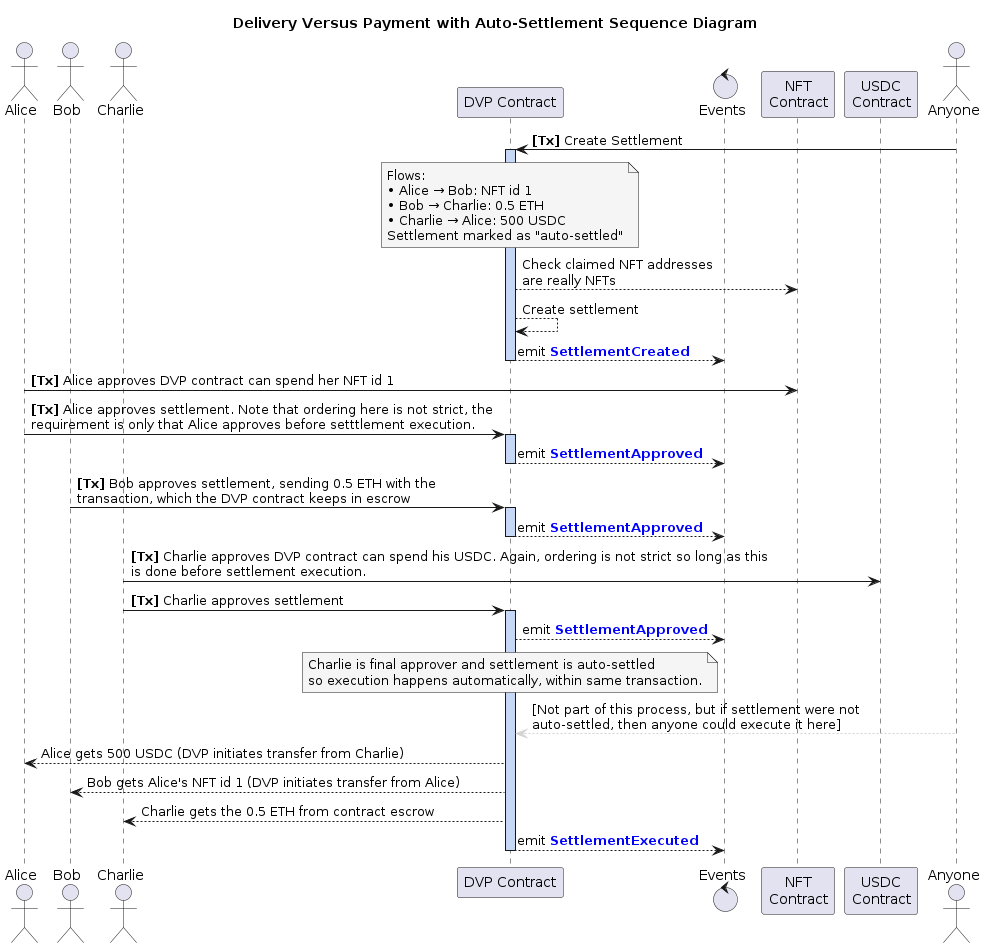
<p>The below diagram shows how the DVP workflow looks for an example three party settlement:</p>
<figure class="">
  
    <a href="/assets/images/posts/dvp-1.png" class="image-popup">
      <img src="/assets/images/posts/dvp-1.png" alt="Delivery Versus Payment: Happy Path Sequence Diagram" />
    </a>
  <figcaption>
      Delivery Versus Payment: Happy Path Sequence Diagram

    </figcaption></figure>]]></content><author><name>Kevin Small</name></author><category term="Web3" /><category term="Delivery Versus Payment" /><category term="Atomic Settlements" /><category term="Ethereum" /><category term="Solidity" /><category term="Reverts" /><summary type="html"><![CDATA[Open-source DVP protocol allowing atomic settlement of digital assets]]></summary></entry><entry><title type="html">ZKPs Prove the Maths, But Who Proves the Input?</title><link href="https://kevinsmall.dev/web3/zkp-who-proves-input/" rel="alternate" type="text/html" title="ZKPs Prove the Maths, But Who Proves the Input?" /><published>2026-03-19T00:00:00+00:00</published><updated>2026-03-18T12:03:01+00:00</updated><id>https://kevinsmall.dev/web3/zkp-who-proves-input</id><content type="html" xml:base="https://kevinsmall.dev/web3/zkp-who-proves-input/"><![CDATA[<h1 id="introduction">Introduction</h1>

<p>In my experience, articles about Zero Knowledge Proofs (ZKPs) tend to assume you are fully on board with their use cases and quickly dive into implementation details of circuits, provers and verifiers.</p>

<p>I think it is worthwhile to start from the business case and work the other way. This way we can learn what use cases there really are.</p>

<p>Imagine you are pitching a carbon-emissions product to a large company. The company wants to prove its emissions are below some threshold. Regulators, investors and customers want confidence in the reported figure. At the same time, the company does not want to expose sensitive internal data such as fleet sizes, routes, fuel usage, warehouse activity, supplier relationships, or anything else that reveals too much about how the business actually operates.</p>

<p>At first glance, ZKP looks perfect for this. You can pitch it in one neat sentence: “we can prove your emissions number is correct without revealing the underlying business data”.</p>

<p>This sounds super! It sounds privacy-preserving, technically sophisticated, exactly the sort of thing people want modern cryptography to do. The company keeps its secrets, outsiders get assurance, maths gets verified and everyone goes home happy.</p>

<p>Except that, if we look carefully, the interesting question was never really whether the maths was done correctly. The interesting question was <strong>where the input data came from</strong>, and why anyone should trust it.</p>

<p>That is the trust boundary, and that is where, in my view, some ZKP business cases start to wobble.</p>

<h1 id="the-carbon-emissions-story">The carbon-emissions story</h1>

<p>Let’s make the example more concrete.</p>

<p>Suppose a company claims it operated 5 trucks over some reporting period. From that, together with whatever other private operational inputs it uses, it calculates total emissions are 100 tons. It then produces a zero knowledge proof showing that this figure really does follow from the underlying calculation.</p>

<p>That sounds impressive, and in one narrow sense it is. The proof verifies, the output is consistent with the supplied input and the report gets a nice cryptographic sheen around it.</p>

<p>But now imagine the truth is that the company actually operated 6 trucks, not 5, but wilfully or accidentally entered 5 trucks into the emmissions calculation.</p>

<p>The ZKP has not proved that the company really operated 5 trucks. It has only proved that <strong>if</strong> the input was 5 trucks, then 100 tons is the correct result of the calculation. That is a much weaker statement than people might think they are buying.</p>

<p>In other words, the proof may be perfectly valid while the business claim is still false. If the trust problem lives <strong>upstream</strong> in the raw data, then the ZKP has not removed that trust. It has just wrapped the output in something that looks much more authoritative.</p>

<p>Now, because it can be fun to get AI to generate images of complex situations, let’s look at it pictorially:</p>

<figure class="">
  
    <a href="/assets/images/posts/zkp-who-proves-input-1.jpg" class="image-popup">
      <img src="/assets/images/posts/zkp-who-proves-input-1.jpg" alt="ZKP Reports 100 tons from 5 trucks, but really there were 6 trucks. The 6th truck is out emitting carbon!" />
    </a>
  <figcaption>
      ZKP shows the 100 tons emissions is correct from 5 trucks, but really there were 6 trucks. The 6th truck is out emitting carbon, and real total emissions are 120 tons.

    </figcaption></figure>

<p>This use case is useful as a thought experiment, because it exposes the trust boundary very clearly. The proof is not fake, the maths is not wrong, the problem is that one thing people care about is whether the hidden input reflects reality. The ZKP on its own does not answer that.</p>

<h2 id="why-this-pitch-still-sounds-so-compelling">Why this pitch still sounds so compelling</h2>

<p>Companies often <strong>do</strong> want to prove something about their operations without revealing all the operational detail underneath. A logistics firm may not want to reveal route-level data. A manufacturer may not want to expose supplier-level information. A trading firm may not want to show position-level detail. None of that is unreasonable.</p>

<p>The mistake is assuming that ZKP solves the separate problem of whether the hidden data is true in the first place, because it does not.</p>

<h2 id="what-the-proof-is-actually-proving">What the proof is actually proving</h2>

<p>This is the stage where it helps to get slightly more technical.</p>

<p>A ZKP lets one party prove that a statement is true without revealing the private data that makes it true. In practice, we can think of four actors here, highlighted in bold: a <strong>ZKP</strong> allows us to prove that some input data <strong>X</strong>, when passed through some computation <strong>Y</strong>, produces some result <strong>Z</strong>, without necessarily revealing <strong>X</strong> itself <sup id="fnref:1"><a href="#fn:1" class="footnote" rel="footnote" role="doc-noteref">1</a></sup>.</p>

<p>So in the carbon-emissions example:</p>

<ul>
  <li><strong>X</strong> is the private operational data, such as truck counts and fuel usage.</li>
  <li><strong>Y</strong> is the carbon-emissions calculation, perhaps some ISO standard.</li>
  <li><strong>Z</strong> is the reported output, such as 100 tons.</li>
  <li>the <strong>ZKP</strong> shows that <strong>Y(X) = Z</strong> without revealing <strong>X</strong>.</li>
</ul>

<p>The ZKP proves that the output was correctly computed from the supplied input, but it does not prove that <strong>X</strong> is true in the real world.</p>

<p>I find it helpful to compare direct verification with a ZKP:</p>

<table>
  <thead>
    <tr>
      <th>Proof Type</th>
      <th>Explanation</th>
    </tr>
  </thead>
  <tbody>
    <tr>
      <td>Direct verification</td>
      <td>Reveal input <strong>X</strong>, let others run computation <strong>Y</strong>, and check that the result is <strong>Z</strong>. Easy peasy.</td>
    </tr>
    <tr>
      <td>Zero Knowledge Proof (ZKP)</td>
      <td>Keep input <strong>X</strong> hidden, but use a <strong>ZKP</strong> to prove that applying computation <strong>Y</strong> to valid input <strong>X</strong> gives result <strong>Z</strong>.</td>
    </tr>
  </tbody>
</table>

<p>There is one more subtlety here. Zero knowledge is about <strong>what the verifier learns</strong>. Whether that verification is also <strong>fast</strong> depends on the proving system being used <sup id="fnref:2"><a href="#fn:2" class="footnote" rel="footnote" role="doc-noteref">2</a></sup>. In many real-world systems, especially blockchain ones, fast verification is a major part of the appeal.</p>

<p>Still, whether verification is fast or private or elegant does not change the central point. If the hidden input <strong>X</strong> is self-reported and untrusted, then all we have really proved is that the claimant did the maths properly on top of their own hidden numbers. That may be better than nothing. It is not the same as proving the business claim people might have thought they were buying.</p>

<h2 id="where-the-trust-still-lives">Where the trust still lives</h2>

<p>Once you see the carbon example in those terms, the broader point becomes fairly simple. If the raw inputs are self-reported and opaque, then the ZKP mainly proves <strong>internal consistency</strong>. So where does the missing trust still live?</p>

<p>If the input comes from signed sensor feeds, independently audited records, regulated disclosures, tamper-resistant hardware, or some other credible attestation layer, then the story becomes much stronger. In that world, the ZKP is no longer being asked to conjure truth out of thin air. The provenance problem is being handled elsewhere, and the ZKP is doing what it is actually good at, which is preserving privacy while still proving correct computation.</p>

<p>So I would not say carbon emissions is always a bad fit for ZK. I would say it is a conditional fit. It only becomes compelling once the upstream data problem has already been solved by something else.</p>

<p>And that, in turn, creates an awkward business question. If an organisation is already prepared to trust that the hidden input data was captured honestly, then in many situations it may also be prepared to trust the rest of the calculation stack. In those cases, the incremental value of the ZKP may be smaller than a pitch deck suggests.</p>

<h1 id="where-zk-is-genuinely-strong">Where ZK is genuinely strong</h1>

<p>Once you separate <strong>truthful input</strong> from <strong>correct computation</strong>, then stronger use cases become easier to spot.</p>

<h2 id="1-passwords-secrets-and-credentials">1. Passwords, secrets and credentials</h2>

<p>Suppose a prover wants to show they know a password, or more generally some secret, without revealing it. They can prove that they know an input which, when hashed, matches a known public value. This is exactly the kind of thing ZKPs are good at, and I wrote more about how these work <a href="/web3/zk-snarks/">in an earlier post</a>.</p>

<p>The important point is not that there is literally only one possible input for a given hash output. That is not true in a strict mathematical sense <sup id="fnref:3"><a href="#fn:3" class="footnote" rel="footnote" role="doc-noteref">3</a></sup>. The point is that, under ordinary cryptographic assumptions, finding <strong>any</strong> secret that satisfies the check without actually knowing the intended one should be computationally infeasible. So the verifier gets confidence that the prover really does know the secret, without learning what it is.</p>

<p>This wasn’t true in our carbon emissions story, because an output of 100 tons doesn’t guarantee only 5 trucks were present in the real world.</p>

<h2 id="2-evm-transactions-and-rollups">2. EVM transactions and rollups</h2>

<p>This is another genuinely strong use case, but for a different reason. Here, the input is typically public. Ethereum transactions are public, the state-transition rules are public and there is nothing especially secret about the underlying computation. So the value of the proof is usually not privacy.</p>

<p>The value is that it lets lots of people verify a large computation cheaply. Processing a large batch of EVM transactions is expensive. Re-executing them all on-chain, or forcing every verifier to do the full work, is labout intensive. A validity proof lets a prover do the heavy computation once, then gives everyone else a much cheaper way to check that the claimed state transition was valid <sup id="fnref:4"><a href="#fn:4" class="footnote" rel="footnote" role="doc-noteref">4</a></sup>.</p>

<p>That is why ZK-based rollups are such a strong use case. The proof ties the claimed output state to the batch of inputs and the execution rules, and it gives verifiers a much cheaper check than rerunning the whole computation themselves. Privacy may be absent entirely, the gain is succinct verification and scalability.</p>

<p>Even here, though, it is worth staying precise. A validity proof shows that the computation was correct. It does <strong>not</strong>, by itself, solve every other problem in the system. If the relevant state data is withheld, users may still have a data-availability problem even though the proof itself is valid <sup id="fnref:5"><a href="#fn:5" class="footnote" rel="footnote" role="doc-noteref">5</a></sup>. Again, the trust has to live somewhere.</p>

<h1 id="what-zkps-actually-solve">What ZKPs actually solve</h1>

<p>A ZKP can remove the need to reveal private input data. A ZKP can remove the need for every verifier to rerun an expensive computation. A ZKP can preserve privacy while still giving confidence in a derived claim. What it cannot do, on its own, is conjure trustworthy real-world input data out of thin air.</p>

<p>This distinction matters because it separates three different kinds of claim:</p>

<ul>
  <li><strong>Cryptographic claims.</strong> “I know a secret that satisfies this relation”.</li>
  <li><strong>Computation claims.</strong> “This output really does follow from these public inputs under these rules”.</li>
  <li><strong>Real-world claims.</strong> “These hidden inputs accurately describe reality”.</li>
</ul>

<p>ZK is excellent at the first two. It is not, on its own, a solution to the third.</p>

<h2 id="footnotes">Footnotes</h2>

<div class="footnotes" role="doc-endnotes">
  <ol>
    <li id="fn:1">
      <p>More formally, ZK systems are often described in terms of a public statement and a private witness satisfying some relation. I am using <strong>X</strong>, <strong>Y</strong>, and <strong>Z</strong> here because I find it easier to read. <a href="#fnref:1" class="reversefootnote" role="doc-backlink">&#8617;</a></p>
    </li>
    <li id="fn:2">
      <p>Strictly speaking, “zero knowledge” and “succinct verification” are different properties. In practice, people often discuss them together because modern SNARK and STARK systems often aim to provide both. <a href="#fnref:2" class="reversefootnote" role="doc-backlink">&#8617;</a></p>
    </li>
    <li id="fn:3">
      <p>Hashes are many-to-one mappings, so collisions exist in principle, but in practice it is not feasible to find out what an input value was for a given hash. <a href="#fnref:3" class="reversefootnote" role="doc-backlink">&#8617;</a></p>
    </li>
    <li id="fn:4">
      <p>In many blockchain settings this is better described as a <strong>validity proof</strong> for a state transition. The zero knowledge property may be present, but the main win is often cheap verification of a correct computation. <a href="#fnref:4" class="reversefootnote" role="doc-backlink">&#8617;</a></p>
    </li>
    <li id="fn:5">
      <p>This is one reason people distinguish between validity and data availability. A proof can show that a transition was valid without guaranteeing that all underlying data needed by users is available to them. <a href="#fnref:5" class="reversefootnote" role="doc-backlink">&#8617;</a></p>
    </li>
  </ol>
</div>]]></content><author><name>Kevin Small</name></author><category term="Web3" /><category term="Zero Knowledge" /><category term="ZK Proofs" /><category term="ZKP" /><category term="Cryptography" /><category term="Ethereum" /><category term="Trust" /><summary type="html"><![CDATA[A clear-eyed look at where zero knowledge proofs genuinely remove trust requirements, and where they quietly push them elsewhere.]]></summary></entry><entry><title type="html">Gas Micro-Optimisation using Storage</title><link href="https://kevinsmall.dev/web3/gas-opt-stor/" rel="alternate" type="text/html" title="Gas Micro-Optimisation using Storage" /><published>2025-09-14T00:00:00+00:00</published><updated>2025-09-15T02:51:44+00:00</updated><id>https://kevinsmall.dev/web3/gas-opt-stor</id><content type="html" xml:base="https://kevinsmall.dev/web3/gas-opt-stor/"><![CDATA[<h1 id="introduction">Introduction</h1>
<p>It is counter-intuitive that making a storage field <em>larger</em> than it needs to be can sometimes save you not only gas at runtime, but also reduce the contract deployment bytesize, but it’s true! In this post we’re going to demonstrate <em>why</em> this can be the case and look at the tools you can use to prove it.</p>

<h1 id="storage-slot-packing-recap">Storage Slot Packing Recap</h1>
<p>It’s pretty standard stuff to pack fields sensibly into storage slots, but this is essential background to the sections that follow. Therefore, we’re going to do a quick recap of storage slot packing in this section, and review some different tooling you can use to review opcodes and measure gas. You can skip this section if you’re already up to speed and go straight to <a href="#packing-a-spare-field">Packing A Spare Field</a>.</p>

<h2 id="evm-persistent-storage">EVM Persistent Storage</h2>
<p>EVM persistent storage is read and written in words, where each word is 32 bytes. Each word is assigned a single storage slot. Each slot can contain one or more fields. When a slot is touched it is considered “warm” for that transaction, which reduces gas fees for all interactions with all the fields in that slot.</p>

<p>When we get down to the opcode level, we’re going to be looking for opcodes <code class="language-plaintext highlighter-rouge">SSTORE</code> to write data and <code class="language-plaintext highlighter-rouge">SLOAD</code> to read data. The <code class="language-plaintext highlighter-rouge">SSTORE</code> opcode in particular is very gas intensive, which is fair enough because we’re writing data to <em>every node in the underlying network</em>. When you first write non-zero data to a field you’re looking at 22100 gas to pay for it.</p>

<p>Let’s take a very simple example contract, one that only has storage fields:</p>
<div class="language-solidity highlighter-rouge"><div class="highlight"><pre class="highlight"><code><span class="k">contract</span> <span class="n">Storage1</span> <span class="p">{</span>
    <span class="kt">address</span> <span class="n">owner_20</span><span class="p">;</span>
    <span class="kt">uint240</span> <span class="n">large_30</span><span class="p">;</span>
    <span class="kt">uint96</span> <span class="n">small_12</span><span class="p">;</span>
    <span class="kt">uint8</span> <span class="n">tiny_01</span><span class="p">;</span>
    <span class="kt">bool</span> <span class="n">flag_01</span><span class="p">;</span>
<span class="p">}</span>
</code></pre></div></div>
<p>The field names include the length of the field in bytes as a postfix. This is just for our convenience, it lets us quickly see sizes in a common unit of measure. Notice that the boolean of two possible values takes up a whole byte, but that’s just the way it is.</p>

<p>We can see how storage is organised like this:</p>
<div class="language-bash highlighter-rouge"><div class="highlight"><pre class="highlight"><code><span class="nv">$ </span>forge inspect Storage1 storageLayout
╭----------+---------+------+--------+-------+--------------------------╮
| Name     | Type    | Slot | Offset | Bytes | Contract                 |
+<span class="o">=======================================================================</span>+
| owner_20 | address | 0    | 0      | 20    | src/Storage.sol:Storage1 |
|----------+---------+------+--------+-------+--------------------------|
| large_30 | uint240 | 1    | 0      | 30    | src/Storage.sol:Storage1 |
|----------+---------+------+--------+-------+--------------------------|
| small_12 | uint96  | 2    | 0      | 12    | src/Storage.sol:Storage1 |
|----------+---------+------+--------+-------+--------------------------|
| tiny_01  | uint8   | 2    | 12     | 1     | src/Storage.sol:Storage1 |
|----------+---------+------+--------+-------+--------------------------|
| flag_01  | bool    | 2    | 13     | 1     | src/Storage.sol:Storage1 |
╰----------+---------+------+--------+-------+--------------------------╯
</code></pre></div></div>
<p>The compiler respects the order in which we declared the variables in our source code, and tries to fit them into a linear series of 32-byte slots. The above shows our contract uses 3 storage slots. The first (slot[0]) contains the address, the second (slot[1]) contains the large integer field, and the remaining fields are all packed into the third slot (slot[2]).</p>

<p>We have some wasted space, though. For example, we can see slot[0] just contains the 20 bytes of an address, which means 12 bytes are left empty in that slot.</p>

<h2 id="reordering-fields">Reordering Fields</h2>
<p>We can save a whole slot by re-ordering our variables. Let’s see what happens if we swap over <code class="language-plaintext highlighter-rouge">large_30</code> and <code class="language-plaintext highlighter-rouge">small_12</code>:</p>
<div class="language-solidity highlighter-rouge"><div class="highlight"><pre class="highlight"><code><span class="k">contract</span> <span class="n">Storage2</span> <span class="p">{</span>
    <span class="kt">address</span> <span class="n">owner_20</span><span class="p">;</span>
    <span class="kt">uint96</span> <span class="n">small_12</span><span class="p">;</span>
    <span class="kt">uint240</span> <span class="n">large_30</span><span class="p">;</span>
    <span class="kt">uint8</span> <span class="n">tiny_01</span><span class="p">;</span>
    <span class="kt">bool</span> <span class="n">flag_01</span><span class="p">;</span>
<span class="p">}</span>
</code></pre></div></div>

<div class="language-bash highlighter-rouge"><div class="highlight"><pre class="highlight"><code><span class="nv">$ </span>forge inspect Storage2 storageLayout
╭----------+---------+------+--------+-------+--------------------------╮
| Name     | Type    | Slot | Offset | Bytes | Contract                 |
+<span class="o">=======================================================================</span>+
| owner_20 | address | 0    | 0      | 20    | src/Storage.sol:Storage2 |
|----------+---------+------+--------+-------+--------------------------|
| small_12 | uint96  | 0    | 20     | 12    | src/Storage.sol:Storage2 |
|----------+---------+------+--------+-------+--------------------------|
| large_30 | uint240 | 1    | 0      | 30    | src/Storage.sol:Storage2 |
|----------+---------+------+--------+-------+--------------------------|
| tiny_01  | uint8   | 1    | 30     | 1     | src/Storage.sol:Storage2 |
|----------+---------+------+--------+----------------------------------|
| flag_01  | bool    | 1    | 31     | 1     | src/Storage.sol:Storage2 |
╰----------+---------+------+--------+-------+--------------------------╯
</code></pre></div></div>
<p>Awesome, now we’ve neatly filled each slot with 32 bytes. As a result, we’ve saved ourselves a whole slot! Why is this good? Well, it’s going to save us gas, let’s see how much.</p>

<h2 id="measuring-gas-usage-for-storage">Measuring Gas Usage for Storage</h2>
<p>To measure gas usage for storage, we’re going to have to enhance our contracts a bit, because at present they’ve got a bunch of fields with the default <code class="language-plaintext highlighter-rouge">internal</code> visibility and no way to update them. So we can’t read or write to storage the way the contracts are just now. Lets fix that:</p>

<div class="language-solidity highlighter-rouge"><div class="highlight"><pre class="highlight"><code><span class="k">contract</span> <span class="n">Storage1</span> <span class="p">{</span>
    <span class="kt">address</span> <span class="k">public</span> <span class="n">owner_20</span><span class="p">;</span>
    <span class="kt">uint240</span> <span class="k">public</span> <span class="n">large_30</span><span class="p">;</span>
    <span class="kt">uint96</span> <span class="k">public</span> <span class="n">small_12</span><span class="p">;</span>
    <span class="kt">uint8</span> <span class="k">public</span> <span class="n">tiny_01</span><span class="p">;</span>
    <span class="kt">bool</span> <span class="k">public</span> <span class="n">flag_01</span><span class="p">;</span>

    <span class="k">function</span> <span class="n">setAllFields</span><span class="p">()</span> <span class="k">external</span> <span class="p">{</span>
        <span class="n">owner_20</span> <span class="o">=</span> <span class="n">msg</span><span class="p">.</span><span class="n">sender</span><span class="p">;</span>
        <span class="n">large_30</span> <span class="o">=</span> <span class="mi">1</span><span class="p">;</span>
        <span class="n">small_12</span> <span class="o">=</span> <span class="mi">2</span><span class="p">;</span>
        <span class="n">tiny_01</span> <span class="o">=</span> <span class="mi">3</span><span class="p">;</span>
        <span class="n">flag_01</span> <span class="o">=</span> <span class="nb">true</span><span class="p">;</span>
    <span class="p">}</span>
<span class="p">}</span>

<span class="k">contract</span> <span class="n">Storage2</span> <span class="p">{</span>
    <span class="kt">address</span> <span class="k">public</span> <span class="n">owner_20</span><span class="p">;</span>
    <span class="kt">uint96</span> <span class="k">public</span> <span class="n">small_12</span><span class="p">;</span>
    <span class="kt">uint240</span> <span class="k">public</span> <span class="n">large_30</span><span class="p">;</span>
    <span class="kt">uint8</span> <span class="k">public</span> <span class="n">tiny_01</span><span class="p">;</span>
    <span class="kt">bool</span> <span class="k">public</span> <span class="n">flag_01</span><span class="p">;</span>

    <span class="k">function</span> <span class="n">setAllFields</span><span class="p">()</span> <span class="k">external</span> <span class="p">{</span>
        <span class="n">owner_20</span> <span class="o">=</span> <span class="n">msg</span><span class="p">.</span><span class="n">sender</span><span class="p">;</span>
        <span class="n">large_30</span> <span class="o">=</span> <span class="mi">1</span><span class="p">;</span>
        <span class="n">small_12</span> <span class="o">=</span> <span class="mi">2</span><span class="p">;</span>
        <span class="n">tiny_01</span> <span class="o">=</span> <span class="mi">3</span><span class="p">;</span>
        <span class="n">flag_01</span> <span class="o">=</span> <span class="nb">true</span><span class="p">;</span>
    <span class="p">}</span>
<span class="p">}</span>
</code></pre></div></div>
<p>You can see from above we’ve made the fields public so that getter functions are automatically generated. We’ve also added a function to set all the fields to a non-zero value. We’re going to measure the gas usage of calling the function that writes all 5 fields at once. We’re going to do this in three different ways and compare the results.</p>

<h3 id="method-1---forge-test-gas-report">Method 1 - Forge Test Gas Report</h3>
<p>Ok let’s throw in a simple test and then we’ll run it with gas reporting enabled:</p>
<div class="language-solidity highlighter-rouge"><div class="highlight"><pre class="highlight"><code><span class="k">contract</span> <span class="n">Storage1And2Test</span> <span class="k">is</span> <span class="n">Test</span> <span class="p">{</span>
    <span class="n">Storage1</span> <span class="k">public</span> <span class="n">storageContract1</span><span class="p">;</span>
    <span class="n">Storage2</span> <span class="k">public</span> <span class="n">storageContract2</span><span class="p">;</span>

    <span class="k">function</span> <span class="n">setUp</span><span class="p">()</span> <span class="k">public</span> <span class="p">{</span>
        <span class="n">storageContract1</span> <span class="o">=</span> <span class="k">new</span> <span class="n">Storage1</span><span class="p">();</span>
        <span class="n">storageContract2</span> <span class="o">=</span> <span class="k">new</span> <span class="n">Storage2</span><span class="p">();</span>
    <span class="p">}</span>

    <span class="k">function</span> <span class="n">testStorage1SetAllFields</span><span class="p">()</span> <span class="k">public</span> <span class="p">{</span>
        <span class="n">storageContract1</span><span class="p">.</span><span class="n">setAllFields</span><span class="p">();</span>
    <span class="p">}</span>

    <span class="k">function</span> <span class="n">testStorage2SetAllFields</span><span class="p">()</span> <span class="k">public</span> <span class="p">{</span>
        <span class="n">storageContract2</span><span class="p">.</span><span class="n">setAllFields</span><span class="p">();</span>
    <span class="p">}</span>
<span class="p">}</span>
</code></pre></div></div>
<p>And then the test output with gas reporting looks like this:</p>
<div class="language-bash highlighter-rouge"><div class="highlight"><pre class="highlight"><code><span class="nv">$ </span>forge <span class="nb">test</span> <span class="nt">--mt</span> Storage1 <span class="nt">--gas-report</span>
...
╭--------------------------+-----------------+-------+--------+-------+---------╮
| src/Storage.sol:Storage1 |                 |       |        |       |         |
+<span class="o">===============================================================================</span>+
| Deployment Cost          | Deployment Size |       |        |       |         |
|--------------------------+-----------------+-------+--------+-------+---------|
| 147163                   | 461             |       |        |       |         |
|--------------------------+-----------------+-------+--------+-------+---------|
| Function Name            | Min             | Avg   | Median | Max   | <span class="c"># Calls |</span>
|--------------------------+-----------------+-------+--------+-------+---------|
| setAllFields             | 87681           | 87681 | 87681  | 87681 | 1       |
╰--------------------------+-----------------+-------+--------+-------+---------╯
</code></pre></div></div>
<p>The above shows us that <code class="language-plaintext highlighter-rouge">Storage1</code> has a deploy bytesize of <strong>461</strong> and function <code class="language-plaintext highlighter-rouge">setAllFields()</code> used <strong>87681</strong> gas.</p>

<h3 id="method-2---use-evm-codes-site">Method 2 - Use EVM Codes Site</h3>
<p>The awesome <a href="https://www.evm.codes/playground">EVM Codes site</a> easily lets us see down to the opcode level and see total gas for a function call. First let’s get the bytecode for our first contract:</p>
<div class="language-bash highlighter-rouge"><div class="highlight"><pre class="highlight"><code><span class="nv">$ </span>forge inspect Storage1 deployedBytecode
0x6080806040526004361015610012575f80fd5b5f3560e01c908163261cec961461015b5750806326e1ecf214610138578063ac56bff114610113578063b2b9b1ea146100eb578063c9544acc1461008d5763e3bdb95a1461005e575f80fd5b34610089575f3660031901126100895760206bffffffffffffffffffffffff60025416604051908152f35b5f80fd5b34610089575f366003190112610089575f8054336001600160a01b0319909116179055600180546001600160f01b03191681179055600280546dffffffffffffffffffffffffffff19166d0103000000000000000000000002179055005b34610089575f366003190112610089576001546040516001600160f01b039091168152602090f35b34610089575f36600319011261008957602060ff60025460681c166040519015158152f35b34610089575f36600319011261008957602060ff60025460601c16604051908152f35b34610089575f366003190112610089575f546001600160a01b03168152602090f3fea264697066735822122051e1c6c214049c5fc2b44b30f22705bfc9c1bc7aba1ead8adc9860b50300e35c64736f6c634300081e0033
</code></pre></div></div>
<p>We also need the data for the function call:</p>
<div class="language-bash highlighter-rouge"><div class="highlight"><pre class="highlight"><code><span class="nv">$ </span>cast calldata <span class="s2">"setAllFields()"</span> <span class="s2">""</span>
0xc9544acc
</code></pre></div></div>
<p>Armed with the bytecode and calldata, we go to <a href="https://www.evm.codes/playground">EVM Codes playground</a> and paste both of these items in and click “run”. We then get the opcode list for the <code class="language-plaintext highlighter-rouge">Storage1</code> contract:</p>

<figure class="">
  
    <a href="/assets/images/posts/gas-opt-stor-evm-1.png" class="image-popup">
      <img src="/assets/images/posts/gas-opt-stor-evm-1.png" alt="EVM Codes Playground: Opcodes for Storage1 Contract" />
    </a>
  <figcaption>
      EVM Codes Playground: Opcodes for Storage1 Contract

    </figcaption></figure>

<p>We clicked “run”, but notice how the site doesn’t <em>execute the whole</em> transaction. It just brings up the opcode list and allows us to then step through the opcodes one at a time. To complete execution of the transaction and see the gas consumed we have to click “continue execution”:</p>

<figure class="">
  
    <a href="/assets/images/posts/gas-opt-stor-evm-2.png" class="image-popup">
      <img src="/assets/images/posts/gas-opt-stor-evm-2.png" alt="EVM Codes Playground: Continue Execution" />
    </a>
  <figcaption>
      EVM Codes Playground: Continue Execution

    </figcaption></figure>

<p>Finally, we can see the gas used is <strong>87681</strong>:</p>

<figure class="">
  
    <a href="/assets/images/posts/gas-opt-stor-evm-3.png" class="image-popup">
      <img src="/assets/images/posts/gas-opt-stor-evm-3.png" alt="EVM Codes Playground: Gas Used" />
    </a>
  <figcaption>
      EVM Codes Playground: Gas Used

    </figcaption></figure>

<p>While we’re here, we can dig into the opcodes a bit further. If you select all the opcodes and paste them into a text editor, and then count how many <code class="language-plaintext highlighter-rouge">SSTORE</code> opcodes there are, how many do you get? You should get 3. That’s because we write to 3 storage slots. Each slot written costs one <code class="language-plaintext highlighter-rouge">SSTORE</code> operation.</p>

<p><strong>Bonus Method:</strong> Note that we could get a similar result of seeing the opcodes using the <a href="https://app.dedaub.com/decompile">decompiler from the dedaub site</a>, just as we did in this <a href="/web3/gas-micro-opt/">earlier post</a>.</p>

<h3 id="method-3---forge-test-with-verbose-logs">Method 3 - Forge Test With Verbose Logs</h3>
<p>We can also see gas consumed from the most verbose logs of a forge test run.</p>
<div class="language-bash highlighter-rouge"><div class="highlight"><pre class="highlight"><code><span class="nv">$ </span>forge <span class="nb">test</span> <span class="nt">--mt</span> Storage1 <span class="nt">-vvvvv</span>
...
Traces:
...
  <span class="o">[</span>71917] Storage1And2Test::testStorage1SetAllFields<span class="o">()</span>
    ├─ <span class="o">[</span>66617] Storage1::setAllFields<span class="o">()</span>
    │   ├─  storage changes:
    │   │   @ 2: 0 → 0x0000000000000000000000000000000000000103000000000000000000000002
    │   │   @ 0: 0 → 0x0000000000000000000000007fa9385be102ac3eac297483dd6233d62b3e1496
    │   │   @ 1: 0 → 1
    │   └─ ← <span class="o">[</span>Stop]
    └─ ← <span class="o">[</span>Stop]
</code></pre></div></div>
<p>We can see from above that the function <code class="language-plaintext highlighter-rouge">setAllFields()</code> cost <strong>66617</strong> gas, and we can see under the section <code class="language-plaintext highlighter-rouge">storage changes:</code> that there were three storage slots written to (numbered <code class="language-plaintext highlighter-rouge">@ 2</code>, <code class="language-plaintext highlighter-rouge">@ 0</code>, <code class="language-plaintext highlighter-rouge">@ 1</code> in the log).</p>

<h2 id="comparing-measurements">Comparing Measurements</h2>
<p>We can repeat the above measurement methods 1 to 3 for the contract <code class="language-plaintext highlighter-rouge">Storage2</code>, and collate the results like so:</p>

<table>
  <thead>
    <tr>
      <th>Measurement</th>
      <th>Contract: Storage1</th>
      <th>Contract: Storage2</th>
    </tr>
  </thead>
  <tbody>
    <tr>
      <td>Deploy Bytecode Size (Bytes)</td>
      <td>461</td>
      <td>391</td>
    </tr>
    <tr>
      <td>Gas cost for setAllFields() [Method 1]</td>
      <td>87681</td>
      <td>65515</td>
    </tr>
    <tr>
      <td>Gas cost for setAllFields() [Method 2]</td>
      <td>87681</td>
      <td>65515</td>
    </tr>
    <tr>
      <td>Gas cost for setAllFields() [Method 3]</td>
      <td>66617</td>
      <td>44451</td>
    </tr>
    <tr>
      <td>Count of SSTOREs in Opcodes</td>
      <td>3</td>
      <td>2</td>
    </tr>
  </tbody>
</table>

<p>We can see that the Storage2 contract was over 20000 gas cheaper, all because we saved writing to a storage slot. It also meant a small contract deploy size, since we needed fewer opcodes (one less <code class="language-plaintext highlighter-rouge">SSTORE</code>).</p>

<p>The figures for method 3 do stand out, though. Why do the gas usage numbers for <code class="language-plaintext highlighter-rouge">forge test ... -vvvvv</code> (method 3) disagree with the other methods? The answer is that methods 1 and 2 include the <em>overhead costs</em> of a full transaction, as it were being called from an external client. Method 3 gives the cost <em>only of the function call</em>, without the transaction “wrapper”. The overhead of the transaction is a flat 21000 gas plus 64 gas for the function selector (16 gas * 4 bytes). It would be higher if we’d passed more calldata.</p>

<h1 id="packing-a-spare-field">Packing A Spare Field</h1>
<p>Now let’s see what happens when we need to pack in one more field. Let’s say we have another <code class="language-plaintext highlighter-rouge">uint8</code> that needs added. Since our storage is already perfectly packed into 32-byte words, we will just plonk it on the end:</p>
<div class="language-solidity highlighter-rouge"><div class="highlight"><pre class="highlight"><code><span class="k">contract</span> <span class="n">Storage3</span> <span class="p">{</span>
    <span class="kt">address</span> <span class="n">owner_20</span><span class="p">;</span>
    <span class="kt">uint96</span> <span class="n">small_12</span><span class="p">;</span>
    <span class="kt">uint240</span> <span class="n">large_30</span><span class="p">;</span>
    <span class="kt">uint8</span> <span class="n">tiny_01</span><span class="p">;</span>
    <span class="kt">bool</span> <span class="n">flag_01</span><span class="p">;</span>
    <span class="kt">uint8</span> <span class="k">public</span> <span class="n">anotherTiny_01</span><span class="p">;</span>  <span class="c1">// &lt;-- the new field
</span><span class="p">}</span>
</code></pre></div></div>

<p>We’ve also removed the other getters, and removed the setter function to simplify. Let’s compare this contract’s deploy size and gas usage with another where we make the new field a <code class="language-plaintext highlighter-rouge">uint256</code> (even though our business requirements only need a <code class="language-plaintext highlighter-rouge">uint8</code>):</p>
<div class="language-solidity highlighter-rouge"><div class="highlight"><pre class="highlight"><code><span class="k">contract</span> <span class="n">Storage4</span> <span class="p">{</span>
    <span class="kt">address</span> <span class="n">owner_20</span><span class="p">;</span>
    <span class="kt">uint96</span> <span class="n">small_12</span><span class="p">;</span>
    <span class="kt">uint240</span> <span class="n">large_30</span><span class="p">;</span>
    <span class="kt">uint8</span> <span class="n">tiny_01</span><span class="p">;</span>
    <span class="kt">bool</span> <span class="n">flag_01</span><span class="p">;</span>
    <span class="kt">uint256</span> <span class="k">public</span> <span class="n">anotherTiny_01</span><span class="p">;</span>  <span class="c1">// &lt;-- the new field, made larger
</span><span class="p">}</span>
</code></pre></div></div>

<h2 id="measuring-gas-usage">Measuring Gas Usage</h2>
<p>Now let’s add a super simple test to just read the field in each case, and see which getter function for the new field <code class="language-plaintext highlighter-rouge">anotherTiny_01</code> consumes the least gas.</p>

<div class="language-solidity highlighter-rouge"><div class="highlight"><pre class="highlight"><code><span class="k">contract</span> <span class="n">Storage3And4Test</span> <span class="k">is</span> <span class="n">Test</span> <span class="p">{</span>
    <span class="n">Storage3</span> <span class="k">public</span> <span class="n">storageContract3</span><span class="p">;</span>
    <span class="n">Storage4</span> <span class="k">public</span> <span class="n">storageContract4</span><span class="p">;</span>

    <span class="k">function</span> <span class="n">setUp</span><span class="p">()</span> <span class="k">public</span> <span class="p">{</span>
        <span class="n">storageContract3</span> <span class="o">=</span> <span class="k">new</span> <span class="n">Storage3</span><span class="p">();</span>
        <span class="n">storageContract4</span> <span class="o">=</span> <span class="k">new</span> <span class="n">Storage4</span><span class="p">();</span>
    <span class="p">}</span>

    <span class="k">function</span> <span class="n">testStorage3And4</span><span class="p">()</span> <span class="k">public</span> <span class="k">view</span> <span class="p">{</span>
        <span class="n">assertEq</span><span class="p">(</span><span class="n">storageContract3</span><span class="p">.</span><span class="n">anotherTiny_01</span><span class="p">(),</span> <span class="mi">0</span><span class="p">);</span>
        <span class="n">assertEq</span><span class="p">(</span><span class="n">storageContract4</span><span class="p">.</span><span class="n">anotherTiny_01</span><span class="p">(),</span> <span class="mi">0</span><span class="p">);</span>
    <span class="p">}</span>    
<span class="p">}</span>
</code></pre></div></div>
<div class="language-bash highlighter-rouge"><div class="highlight"><pre class="highlight"><code><span class="nv">$ </span>forge <span class="nb">test</span> <span class="nt">--mt</span> Storage3And4 <span class="nt">--gas-report</span>
...
╭---------------------------+-----------------+------+--------+------+---------╮
| src/Storage.sol:Storage3  |                 |      |        |      |         |
+<span class="o">==============================================================================</span>+
| Deployment Cost           | Deployment Size |      |        |      |         |
|---------------------------+-----------------+------+--------+------+---------|
| 79371                     | 144             |      |        |      |         |
|---------------------------+-----------------+------+--------+------+---------|
| Function Name             | Min             | Avg  | Median | Max  | <span class="c"># Calls |</span>
|---------------------------+-----------------+------+--------+------+---------|
| anotherTiny_01            | 2248            | 2248 | 2248   | 2248 | 1       |
╰---------------------------+-----------------+------+--------+------+---------╯

╭---------------------------+-----------------+------+--------+------+---------╮
| src/Storage.sol:Storage4  |                 |      |        |      |         |
+<span class="o">==============================================================================</span>+
| Deployment Cost           | Deployment Size |      |        |      |         |
|---------------------------+-----------------+------+--------+------+---------|
| 78723                     | 141             |      |        |      |         |
|---------------------------+-----------------+------+--------+------+---------|
| Function Name             | Min             | Avg  | Median | Max  | <span class="c"># Calls |</span>
|---------------------------+-----------------+------+--------+------+---------|
| anotherTiny_01            | 2242            | 2242 | 2242   | 2242 | 1       |
╰---------------------------+-----------------+------+--------+------+---------╯
</code></pre></div></div>
<p>The above shows the surprising result, that not only is the <code class="language-plaintext highlighter-rouge">uint256</code> storage variable giving us a <em>smaller</em> contract deployment size (141 versus 144 bytes), it is also consuming <em>less gas</em> when we read it (2242 versus 2248 gas)!</p>

<p>How can this be? How can making a field <em>larger</em> be more efficient? To answer that, we need to look into what opcodes are being used.</p>

<h2 id="opcode-analysis">Opcode Analysis</h2>
<p>We get the deployed bytecode for contract <code class="language-plaintext highlighter-rouge">Storage3</code> like this:</p>
<div class="language-bash highlighter-rouge"><div class="highlight"><pre class="highlight"><code><span class="nv">$ </span>forge inspect Storage3 deployedBytecode
0x60808060405260043610156011575f80fd5b5f3560e01c63801147b7146023575f80fd5b34603e575f366003190112603e5760209060ff600254168152f35b5f80fdfea2646970667358221220450ff733407af87c2e1ce4d218c1c4712e7e982f7db6753aeb65e5d71f90a50664736f6c634300081e0033
</code></pre></div></div>
<p>We get the information we need for the calldata field like this:</p>
<div class="language-bash highlighter-rouge"><div class="highlight"><pre class="highlight"><code><span class="nv">$ </span>cast calldata <span class="s2">"anotherTiny_01()"</span> <span class="s2">""</span>
0x801147b7
</code></pre></div></div>
<p>And again we can use the <a href="https://www.evm.codes/playground">EVM Codes site</a> and paste in the deployed bytecode and the calldata of <code class="language-plaintext highlighter-rouge">0x801147b7</code> to see the opcodes. These are the same steps we took in <a href="#method-2---use-evm-codes-site">this earlier section</a> to look at gas usage. We then repeat above steps for contract <code class="language-plaintext highlighter-rouge">Storage4</code> and we can compare how the source opcodes look.</p>

<p>The reason for the difference lies near the end of the contract opcode list. To orientate ourselves in the code, we’re looking for an <code class="language-plaintext highlighter-rouge">SLOAD</code> opcode (which is us reading a value from storage) near to a <code class="language-plaintext highlighter-rouge">RETURN</code> opcode (which is the function returning the value). Let’s see both listings, with annotations, then I’ll explain more:</p>

<p><strong>Opcode List Extract for Storage3</strong></p>
<div class="language-plaintext highlighter-rouge"><div class="highlight"><pre class="highlight"><code>[32] PUSH1 20   &lt;-- Prepare offset in stack, we'll return this later
[34] SWAP1      &lt;-- Arrange stack
[35] PUSH1 ff   &lt;-- [EXTRA] Prepare a mask of 1 byte
[37] PUSH1 02   &lt;-- Push 2 to stack (representing storage slot #2)
[39] SLOAD      &lt;-- Load storage slot #2 (the field anotherTiny_01)
[3a] AND        &lt;-- [EXTRA] Combine mask with SLOADed data, so we read 1st byte
[3b] DUP2       &lt;-- Duplicate the offset because MSTORE will consume it
[3c] MSTORE     &lt;-- Copy to memory 
[3d] RETURN     &lt;-- Return memory as function return value
</code></pre></div></div>

<p><strong>Opcode List Extract for Storage4</strong></p>
<div class="language-plaintext highlighter-rouge"><div class="highlight"><pre class="highlight"><code>[32] PUSH1 20   &lt;-- Prepare offset in stack, we'll return this later
[34] SWAP1      &lt;-- Arrange stack
[35] PUSH1 02   &lt;-- Push 2 (representing storage slot #2) to stack
[37] SLOAD      &lt;-- Load storage slot #2 (the field anotherTiny_01)
[38] DUP2       &lt;-- Duplicate the offset because MSTORE will consume it
[39] MSTORE     &lt;-- Copy to memory 
[3a] RETURN     &lt;-- Return memory as function return value
</code></pre></div></div>

<p>What the above shows is that the <code class="language-plaintext highlighter-rouge">Storage3</code> contract has two extra opcodes, annotated with <code class="language-plaintext highlighter-rouge">[EXTRA]</code>. Remember that slots are read in whole 32-byte words, even if you touch only a small part of that word. What these additional opcodes are doing is <em>masking</em> the 32-bytes returned by the <code class="language-plaintext highlighter-rouge">SLOAD</code> such that only the 1 byte of our field <code class="language-plaintext highlighter-rouge">anotherTiny_01</code> is allowed to “shine through”. Since the ABI returns a 32-byte word anyway, this overhead of chopping out just the 1 byte we use, is using more gas than we need.</p>

<p>In contract <code class="language-plaintext highlighter-rouge">Storage4</code> we’re saving two opcode operations, because we just read out and return the whole 32-byte word from storage. This is why we save deployed bytesize <em>and</em> gas!</p>

<p>There is a small downside, though. If we make our field <code class="language-plaintext highlighter-rouge">uint256</code> instead of <code class="language-plaintext highlighter-rouge">uint8</code> we’re losing some degree of type safety, because perhaps we’d like the EVM to revert if our value gets too big.</p>

<p>Nevertheless, it’s an interesting micro-optimisation and sheds some light on EVM internals and the tools used to examine it.</p>]]></content><author><name>Kevin Small</name></author><category term="Web3" /><category term="Gas" /><category term="Opcodes" /><category term="Storage" /><category term="Solidity" /><category term="Ethereum" /><summary type="html"><![CDATA[Using low-level opcode tools to demonstrate gas micro-optimisation using storage.]]></summary></entry><entry><title type="html">Gas Micro-Optimisation using Function Names</title><link href="https://kevinsmall.dev/web3/gas-micro-opt/" rel="alternate" type="text/html" title="Gas Micro-Optimisation using Function Names" /><published>2025-09-13T00:00:00+00:00</published><updated>2025-09-14T04:36:09+00:00</updated><id>https://kevinsmall.dev/web3/gas-micro-opt</id><content type="html" xml:base="https://kevinsmall.dev/web3/gas-micro-opt/"><![CDATA[<h1 id="introduction">Introduction</h1>
<p>You may think that the function names you choose in your Solidity contracts don’t matter when it comes to runtime gas consumption, and to an extent that is true. However, there are edge cases where function naming <em>does</em> affect runtime gas consumption! In this post we’re going to demonstrate this, as well as the tooling you can use to prove it. We’re going to use Foundry tools, but you don’t need those to follow along.</p>

<h1 id="function-selectors">Function Selectors</h1>
<p>It is true that the length of the function name makes no difference to how the contract is deployed or how it behaves on-chain, because the function name <em>doesn’t go on-chain at all</em>. When a contract is compiled, a <strong>function selector</strong> is calculated for each function, and <em>that</em> is what goes into the bytecode and goes on-chain. The function selector is the first 4-bytes of the Keccak-256 hash of the canonical signature of the function. For example:</p>

<table>
  <thead>
    <tr>
      <th>Solidity Source Code</th>
      <th>Canonical Signature</th>
      <th>Keccak-256 of Canonical Signature == Function Selector</th>
    </tr>
  </thead>
  <tbody>
    <tr>
      <td><code class="language-plaintext highlighter-rouge">function setNumberC(uint256 number) external</code></td>
      <td><code class="language-plaintext highlighter-rouge">setNumberC(uint256)</code></td>
      <td><code class="language-plaintext highlighter-rouge">0x1b877640</code></td>
    </tr>
  </tbody>
</table>

<p>So from above, it is clear that it doesn’t matter if our function name is 10 characters long or 50 characters long, because what gets deployed in the compiled bytecode is a function selector that is always 4 bytes long. All well and good, but why then might function names matter? To answer that we need to get to a lower level, and examine what happens at the opcode level.</p>

<h1 id="the-jump-table">The Jump Table</h1>
<p>When your contract is compiled, part of the resulting code is a <strong>jump table</strong>. The jump table is used to check what function is being asked for from the transaction data field, and jumps to the correct memory location for that function body. The code that does this is <em>referred to</em> as a jump table, but it isn’t a table in the database sense, it is just more bytecode.</p>

<p>Let’s look at a worked example to make this clearer. First let’s go with some standard optimisation, so in <code class="language-plaintext highlighter-rouge">foundry.toml</code> we have:</p>
<div class="language-toml highlighter-rouge"><div class="highlight"><pre class="highlight"><code><span class="py">optimizer</span> <span class="p">=</span> <span class="kc">true</span>
<span class="py">optimizer_runs</span> <span class="p">=</span> <span class="mi">200</span>
</code></pre></div></div>
<p>Next, let’s consider the below Solidity contract:</p>
<div class="language-solidity highlighter-rouge"><div class="highlight"><pre class="highlight"><code><span class="c1">// SPDX-License-Identifier: MIT
</span><span class="k">pragma</span> <span class="n">solidity</span> <span class="o">^</span><span class="mf">0.8</span><span class="p">.</span><span class="mi">30</span><span class="p">;</span>

<span class="k">contract</span> <span class="n">JumpTable</span> <span class="p">{</span>
    <span class="kt">uint256</span> <span class="k">private</span> <span class="n">_number</span><span class="p">;</span>

    <span class="k">function</span> <span class="n">setNumberA</span><span class="p">(</span><span class="kt">uint256</span> <span class="n">number</span><span class="p">)</span> <span class="k">external</span> <span class="p">{</span>
        <span class="n">_number</span> <span class="o">=</span> <span class="n">number</span><span class="p">;</span>
    <span class="p">}</span>

    <span class="k">function</span> <span class="n">setNumberB</span><span class="p">(</span><span class="kt">uint256</span> <span class="n">number</span><span class="p">)</span> <span class="k">external</span> <span class="p">{</span>
        <span class="n">_number</span> <span class="o">=</span> <span class="n">number</span><span class="p">;</span>
    <span class="p">}</span>

    <span class="k">function</span> <span class="n">setNumberC</span><span class="p">(</span><span class="kt">uint256</span> <span class="n">number</span><span class="p">)</span> <span class="k">external</span> <span class="p">{</span>
        <span class="n">_number</span> <span class="o">=</span> <span class="n">number</span><span class="p">;</span>
    <span class="p">}</span>

    <span class="k">function</span> <span class="n">setNumberD</span><span class="p">(</span><span class="kt">uint256</span> <span class="n">number</span><span class="p">)</span> <span class="k">external</span> <span class="p">{</span>
        <span class="n">_number</span> <span class="o">=</span> <span class="n">number</span><span class="p">;</span>
    <span class="p">}</span>
<span class="p">}</span>
</code></pre></div></div>
<p>The above shows we have 4 identical functions. We can get the function selectors like this:</p>
<div class="language-bash highlighter-rouge"><div class="highlight"><pre class="highlight"><code><span class="nv">$ </span>forge inspect JumpTable methodIdentifiers
╭---------------------+------------╮
| Method              | Identifier |
+<span class="o">==================================</span>+
| setNumberA<span class="o">(</span>uint256<span class="o">)</span> | 4c67b768   |
|---------------------+------------|
| setNumberB<span class="o">(</span>uint256<span class="o">)</span> | 6e19ab5d   |
|---------------------+------------|
| setNumberC<span class="o">(</span>uint256<span class="o">)</span> | 1b877640   |
|---------------------+------------|
| setNumberD<span class="o">(</span>uint256<span class="o">)</span> | fe13be0d   |
╰---------------------+------------╯
</code></pre></div></div>
<p>If we wanted to call function <code class="language-plaintext highlighter-rouge">setNumberC(2)</code> we could work out what calldata to use like this:</p>
<div class="language-bash highlighter-rouge"><div class="highlight"><pre class="highlight"><code><span class="nv">$ </span>cast calldata <span class="s2">"setNumberC(uint256)"</span> <span class="s2">"2"</span>
0x1b8776400000000000000000000000000000000000000000000000000000000000000002
</code></pre></div></div>
<p>The first 4 bytes of the above result is us telling the EVM what function we want to call. We are passing the function selector <code class="language-plaintext highlighter-rouge">0x1b877640</code>. That selector id matches the value from the table earlier, when we did <code class="language-plaintext highlighter-rouge">forge inspect</code>. The other 32 bytes of the calldata contain the parameter value of 2, padded out to fill one 32-byte word.</p>

<p>When the EVM receives this calldata, it checks all the function names to see which one, if any, it should execute. It is the equivalent of doing a bunch of <code class="language-plaintext highlighter-rouge">if</code> statements to see if the contract has the function being asked for. The code to do this is called the jump table. Let’s examine the compiled code more closely so we can see how the jump table works.</p>

<h2 id="examining-opcodes-for-the-jump-table">Examining Opcodes for The Jump Table</h2>
<p>We get the deployed bytecode like this:</p>
<div class="language-bash highlighter-rouge"><div class="highlight"><pre class="highlight"><code><span class="nv">$ </span>forge inspect JumpTable deployedBytecode
0x608060405260043610156010575f80fd5b5f3560e01c80631b8776401460405780634c67b7681460405780636e19ab5d1460405763fe13be0d146040575f80fd5b3460565760203660031901126056576004355f55005b5f80fdfea26469706673582212204d9d17a05e72cb1931b3eb546aa7112b1616522ba8d31b419d8482dfe4e3926a64736f6c634300081e0033
</code></pre></div></div>
<p>We can get the opcodes from that in a few ways. The <a href="https://www.evm.codes/playground">EVM Codes Playground</a> is great, but we’ll try <a href="https://app.dedaub.com/decompile?network=ethereum">dedaub</a> this time. Go to the <a href="https://app.dedaub.com/decompile?network=ethereum">dedaub</a> site, click “Decompiler” on the top menu and paste in the bytecode we just got:</p>
<figure class="">
  
    <a href="/assets/images/posts/gas-micro-opt-dedaub-init.png" class="image-popup">
      <img src="/assets/images/posts/gas-micro-opt-dedaub-init.png" alt="Dedaub initial screen" />
    </a>
  <figcaption>
      Dedaub initial compiler screen

    </figcaption></figure>

<p>Then click the “decompile” button and wait a short while to see the output. Scroll down a little until you can see the <code class="language-plaintext highlighter-rouge">CALLDATALOAD</code> opcode:</p>

<figure class="">
  
    <a href="/assets/images/posts/gas-micro-opt-dedaub.png" class="image-popup">
      <img src="/assets/images/posts/gas-micro-opt-dedaub.png" alt="Dedaub showing opcodes" />
    </a>
  <figcaption>
      Dedaub showing opcodes for the deployed JumpTable.sol contract

    </figcaption></figure>

<p>The above shows the jump table checking the call data against each of the function selectors we derived earlier. We don’t need to go through it line by line, but you can get the flavour of it: the <code class="language-plaintext highlighter-rouge">PUSH4</code> opcodes are pushing the known function selectors onto the stack and if we get a match with the function our calldata asked for, then we do a <code class="language-plaintext highlighter-rouge">JUMP</code> to the function implementation (the <code class="language-plaintext highlighter-rouge">JUMPI</code> opcodes jump if a condition is met).</p>

<p>Now here is the <strong>critical point</strong>: we can see from above that if the function we asked for was the <em>first hit</em> in the jump table, we’re going to have to do <em>less work</em> than if it were the <em>final hit</em> in that jump table.</p>

<p>Less work means less gas! The functions are listed in the jump table ordered not by their long <em>function names</em>, but by their <em>function selectors</em>. You can see the first function selector checked in the jump table is <code class="language-plaintext highlighter-rouge">0x1b877640</code> which is for function <code class="language-plaintext highlighter-rouge">setNumberC()</code>. This means that function C should cost less gas than all the others, even though all functions do the same thing! Let’s prove it.</p>

<h1 id="proving-function-c-is-the-cheapest">Proving Function C is the Cheapest</h1>
<p>Let’s write ourselves a super simple test, then we can use the forge gas report to see which function is cheapest.</p>
<div class="language-plaintext highlighter-rouge"><div class="highlight"><pre class="highlight"><code>// SPDX-License-Identifier: MIT
pragma solidity 0.8.30;

import "forge-std/Test.sol";
import "../../src/internals/JumpTable.sol";

contract JumpTableTest is Test {
    JumpTable public jumpTableContract;

    function setUp() public {
        jumpTableContract = new JumpTable();
    }

    function testJumpTableA() public {
        jumpTableContract.setNumberA(2);
    }

    function testJumpTableB() public {
        jumpTableContract.setNumberB(2);
    }

    function testJumpTableC() public {
        jumpTableContract.setNumberC(2);
    }

    function testJumpTableD() public {
        jumpTableContract.setNumberD(2);
    }
}
</code></pre></div></div>
<p>We can run the test like this:</p>
<div class="language-bash highlighter-rouge"><div class="highlight"><pre class="highlight"><code><span class="nv">$ </span>forge <span class="nb">test</span> <span class="nt">--mt</span> JumpTable <span class="nt">--gas-report</span>
...
╭----------------+-----------+-------+--------+-------+---------╮
| Function Name  | Min       | Avg   | Median | Max   | <span class="c"># Calls |</span>
|----------------+-----------+-------+--------+-------+---------|
| setNumberA     | 43456     | 43456 | 43456  | 43456 | 1       |
|----------------+-----------+-------+--------+-------+---------|
| setNumberB     | 43478     | 43478 | 43478  | 43478 | 1       |
|----------------+-----------+-------+--------+-------+---------|
| setNumberC     | 43434     | 43434 | 43434  | 43434 | 1       |
|----------------+-----------+-------+--------+-------+---------|
| setNumberD     | 43497     | 43497 | 43497  | 43497 | 1       |
╰----------------+-----------+-------+--------+-------+---------╯
</code></pre></div></div>
<p>We can see Function C is always cheaper! In fact cheaper by 63 gas compared with the most expensive, function B. The order of gas consumption from cheapest to most expensive is: C, A, B, D. This matches our function selectors if we order them by selector id:</p>
<div class="language-bash highlighter-rouge"><div class="highlight"><pre class="highlight"><code>╭---------------------+------------╮
| Method              | <span class="o">(</span>Sorted<span class="o">)</span>   |
+<span class="o">==================================</span>+
| setNumberC<span class="o">(</span>uint256<span class="o">)</span> | 1b877640   |
|---------------------+------------|
| setNumberA<span class="o">(</span>uint256<span class="o">)</span> | 4c67b768   |
|---------------------+------------|
| setNumberB<span class="o">(</span>uint256<span class="o">)</span> | 6e19ab5d   |
|---------------------+------------|
| setNumberD<span class="o">(</span>uint256<span class="o">)</span> | fe13be0d   |
╰---------------------+------------╯
</code></pre></div></div>
<p>So there you have it. If you know you have a function that will be called significantly more than others, you can save a tiny bit of gas by carefully picking a function name that hashes to give a function selector that sorts <em>before</em> the other function selectors.</p>

<h1 id="caveats">Caveats</h1>
<p>Although it is fun to step through opcodes and review what the compiler produces, there are some pretty important caveats to this micro-optimisation:</p>
<ul>
  <li>Once you get above 8 functions, the compiler optimises, and switches to producing code that does a binary search to decide which jump table item was hit. So in practice this micro-optimisation isn’t going to be very common.</li>
  <li>The gas saving was miniscule, 60 gas out of 23500 or 0.2% in this toy example. In extreme usage cases this might matter, but in most cases it won’t matter.</li>
  <li>The cognitive load of obfuscating your own function names by choosing a name you didn’t want to, may outweigh the benefit. I know it’s not really obfuscation, as you could postfix your chosen function name with something small, but the principle remains, that this adds to the visual complexity.</li>
</ul>]]></content><author><name>Kevin Small</name></author><category term="Web3" /><category term="Gas" /><category term="Opcodes" /><category term="Solidity" /><category term="Ethereum" /><summary type="html"><![CDATA[Using low-level opcode tools to demonstrate gas micro-optimisations with function names.]]></summary></entry><entry><title type="html">Gaining an Intuitive Understanding of Bonding Curves</title><link href="https://kevinsmall.dev/web3/bonding-curves/" rel="alternate" type="text/html" title="Gaining an Intuitive Understanding of Bonding Curves" /><published>2025-08-24T00:00:00+00:00</published><updated>2025-08-25T04:36:09+00:00</updated><id>https://kevinsmall.dev/web3/bonding-curves</id><content type="html" xml:base="https://kevinsmall.dev/web3/bonding-curves/"><![CDATA[<h1 id="gaining-an-intuitive-understanding-of-bonding-curves">Gaining an Intuitive Understanding of Bonding Curves</h1>
<p>After wading through tons (and tons) of documentation about AMMs and bonding curves I found that some concepts, if I’d understood them at the start, would have made learning so much easier. I’ve collected these observations here, in the hope that it helps others understand how bonding curves work. But before we dive into bonding curves themselves, we need to understand some other terminology and background.</p>

<h2 id="order-books">Order Books</h2>
<p>When people want to trade something, a common pattern is to maintain an <em>order book</em>. An order book lets buyers record what they want to buy (e.g. Alice wants to buy 100 apples and is prepared to accept 90 pears), and lets sellers record what they want to sell (e.g. Bob wants to sell 90 pears and wants 100 apples). A third party can then use that order book to <em>match</em> buyers with sellers and help perform the asset transfers. This works well so long as you have active lists of buyers and sellers and you can find matches.</p>

<h2 id="automated-market-makers">Automated Market Makers</h2>
<p>An alternative to this order book matching idea has been discussed since the early 2000s. It is the <em>Automated Market Maker</em> or AMM. The idea is that a “pool” is created that contains all the assets that people might want to trade “pre-loaded”. So in our example, we could create an “apples &amp; pears” pool and load it with hundreds of apples and pears. That way, a buyer or seller of either fruit would be able to do their trade directly with this pool, at any time, without having to wait to find a matching order.</p>

<p>The people who fill the pool with the assets are called <em>Liquidity Providers</em> or LPs. They generally deposit lots of both the assets that buyers and sellers want to trade between. LPs can earn a return by taking a percentage of each trade done in the pool. Various pool projects also offer other incentives like bonuses to attract LPs.</p>

<h2 id="bonding-curves">Bonding Curves</h2>
<p>The idea of AMMs came to the fore again with early blockchain work, Uniswap being one of the <a href="https://bennyattar.substack.com/p/the-evolution-of-amms">early implementations</a>. A thorny question for AMMs was “how can we fairly price the assets in this pool?” and that is answered by using a bonding curve. It is basically a formula, the purpose being to help allow the AMM pool to offer fair prices to buyers and sellers, regardless of their desired trade size and the pool state.</p>

<h1 id="some-insights">Some Insights</h1>
<p>In the below, we’re going to imagine we’re dealing with an AMM pool that can be used to swap back and forth between gold coins and silver coins. These coins of course could represent any on-chain tokens, but for the analogies to work well it’s sometimes helpful to imagine physical coins that we can stack. To make the diagrams easier, we’re going to pretend the silver coins are really high quality and the gold ones are lesser quality, such that <em>initially</em> the coins should trade at 1:1.</p>

<h2 id="1-a-bonding-curve-is-like-a-maze-panel">1. A Bonding Curve is like a Maze Panel</h2>
<p>Imagine you’re in a playground and you see one of those panel things that lets you slide a handle along a curve. The handle is fixed to the rails so can only move where the curve allows it to. It turns out these are called “maze panels” and they can help us form a really useful analogy to a bonding curve.</p>

<figure class="">
  
    <a href="/assets/images/posts/bonding-curves-maze.jpg" class="image-popup">
      <img src="/assets/images/posts/bonding-curves-maze.jpg" alt="Maze Panel" />
    </a>
  <figcaption>
      Officially called a Maze Panel but is a useful analogy to a bonding curve

    </figcaption></figure>

<p>Imagine the maze panel represents our pool. Wherever the yellow handle is, marks the <em>current state</em> of the pool. The pool state is simply an amount of gold and silver coins. Only the states along the maze panel’s engineered curve are allowed. The pool <em>can’t be in any other state</em> any more than you can move the yellow handle anywhere apart from that pre-defined curve. That maze panel curve <em>is</em> our bonding curve.</p>

<p>How exactly does the yellow handle represent state? The yellow handle gives us a single <code class="language-plaintext highlighter-rouge">(x, y)</code> coordinate, where x represents the amount of gold coins, y the amount of silver coins. We can imagine stacks of coins, representing the tokens in the pool, neatly arranged to run from the edges of the maze panel (the x and y axes) to the yellow handle (the current pool state). We can clearly see how many tokens there are in the pool for its given state:</p>

<figure class="">
  
    <a href="/assets/images/posts/bonding-curves-coins.jpg" class="image-popup">
      <img src="/assets/images/posts/bonding-curves-coins.jpg" alt="Maze Panel with coins" />
    </a>
  <figcaption>
      Current pool state, represented by the yellow handle, is defined by an amount of gold and silver coins

    </figcaption></figure>

<p>Or we can draw on some axes and show the same amounts of coins like this:</p>

<figure class="">
  
    <a href="/assets/images/posts/bonding-curves-coins-xy.jpg" class="image-popup">
      <img src="/assets/images/posts/bonding-curves-coins-xy.jpg" alt="Maze Panel with coins xy" />
    </a>
  <figcaption>
      Add axes to show gold coins (x) and silver coins (y)

    </figcaption></figure>

<p>We can also imagine, if the yellow handle were moved <em>to the left</em>, so that it slid along the curve and upwards, then that new pool state would have <em>fewer gold coins</em> and <em>more silver coins</em>. The bonding curve is never perfectly horizontal or vertical, it’s always got a slight slope. It hard to get that visually accurate in the maze panel photos, but we can imagine.</p>

<p>That leads us to the question, then, <em>how does</em> the pool change state? What can cause the handle to move? The answer to that, lies in how we <em>interact</em> with the pool. We’ve got two main choices:</p>
<ul>
  <li>When someone <em>trades</em> with the pool (that is, they do a swap) then that yellow handle slides a bit to the left or right, according to which direction the swap was. When someone does a swap, the put in some coins and remove some coins. This causes the heights of the stacks of coins to change and so moves the yellow handle. The size of the trade (the quantities of each coin) affects how far the handle moves. We’re going to look at how trades work in more detail in the next section: <a href="#2-you-affect-the-price-you-get">‘You Affect the Price You Get’</a>.</li>
  <li>When someone <em>adds or removes liquidity</em> in the pool, something special happens to the curve shape on our maze panel. We discuss this more in the section <a href="#3-the-invariant-is-not-invariant">‘The Invariant is Not Invariant’</a>.</li>
</ul>

<h2 id="2-you-affect-the-price-you-get">2. You Affect the Price You Get</h2>
<p>Ok, so now we’re going to look in detail at how a trade (a swap) affects the pool. We know already that trades are going to “move the yellow handle” in our maze panel analogy, but by how far?</p>

<p>Let’s imagine our pool has 100 gold and 100 silver coins so it starts off with an initial pool state of <code class="language-plaintext highlighter-rouge">(100, 100)</code>. Alice comes along and says “I want to buy some silver, here is 30 gold what will I get back?”. The AMM pool can do a calculation to answer this. The bonding curve is fixed in place, like our maze panel slot, but we can slide along it by <code class="language-plaintext highlighter-rouge">+30</code> coins along the gold <code class="language-plaintext highlighter-rouge">(x)</code> axis and see what silver <code class="language-plaintext highlighter-rouge">(y)</code> coordinate we will get as a result:</p>

<figure class="">
  
    <a href="/assets/images/posts/bonding-curves-swap.png" class="image-popup">
      <img src="/assets/images/posts/bonding-curves-swap.png" alt="The size of the trade affects how far we move along the bonding curve" />
    </a>
  <figcaption>
      The size of the trade affects how far we move along the bonding curve

    </figcaption></figure>

<p>The diagram shows that if we move <code class="language-plaintext highlighter-rouge">+30</code> along the x-axis (<code class="language-plaintext highlighter-rouge">dx</code>) we will end up with a y-coordinate movement of <code class="language-plaintext highlighter-rouge">100 - 72</code> which is <code class="language-plaintext highlighter-rouge">-28 (dy)</code>. So Alice will get back 28 silver coins.</p>

<p>This is the heart of how AMMs work. Alice, as the trader, can control how big a trade she asks for. If she were to say she wants to spend 300 gold coins, we’d end up sliding along the x-axis for a long way, but we’d only move a relatively short distance on the y-axis. So Alice would get a really bad deal on a gigantic trade that adds lots of gold.</p>

<p>Alice’s better strategy would be to do multiple small trades, and hope <em>other traders</em> take the opposite swap direction in between. The closer the yellow handle is to the centre of the chart, the better the price is for everyone.</p>

<p>If Alice did decide to spend 300 gold on some silver, regardless of the fact she’d get a bad deal, then what would happen? The yellow handle would move way to the right of the curve, and then other traders are incentivised to move it back to the centre again, to go the opposite way, because the pool would be offering an awesome deal on purchases of gold. Alice would have made the pool “gold heavy” and that means using a small amount of silver to buy gold would get us a great deal. Our pool’s customers are incentivised to bring the pool back to balance again.</p>

<h2 id="3-the-invariant-is-not-invariant">3. The Invariant is Not Invariant</h2>
<p>As already mentioned, Liquidity Providers (LPs) pour in pairs of tokens to AMM pools. In our sample pool of gold and silver coins, we expect it to start off balanced and to trade at around 1:1 when the pool starts up.</p>

<p>What is interesting, though, is what happens to our maze panel curve when an LP adds pairs of tokens to an AMM pool <em>after</em> that initial deployment. As mentioned, a bonding curve is just a formula. For example, Uniswap use the famous <em>constant product formula</em> <code class="language-plaintext highlighter-rouge">x.y = k</code> which says that the quantity of gold coins times the quantity of silver coins must always equal the constant <code class="language-plaintext highlighter-rouge">k</code>. This value <code class="language-plaintext highlighter-rouge">k</code> is often called “the invariant” and the formula itself is called “the invariant formula”.</p>

<p>But here’s the insight, the invariant <code class="language-plaintext highlighter-rouge">k</code> is <em>not</em> invariant when an LP adds or removes liquidity. When an LP adds more liquidity the value <code class="language-plaintext highlighter-rouge">k</code> increases, because we have more gold coins and silver coins to go around. If an LP removes liquidity we have less to go around, and <code class="language-plaintext highlighter-rouge">k</code> has to decrease. The invariant <code class="language-plaintext highlighter-rouge">k</code> is only really invariant during swaps. Note however, that the bonding curve formula remains the same (<code class="language-plaintext highlighter-rouge">x.y = k</code> in this example), it’s just that one of the parameters is changing.</p>

<p>Here’s a diagram of how the curve (aka our maze panel slot) changes as more liquidity is added:</p>

<figure class="">
  
    <a href="/assets/images/posts/bonding-curves-lp-add.png" class="image-popup">
      <img src="/assets/images/posts/bonding-curves-lp-add.png" alt="Bonding curve changing as liquidity is added" />
    </a>
  <figcaption>
      Bonding curve moves and changes shape as liquidity is added

    </figcaption></figure>

<p>We can see the curve “flattens” as more liquidity is added. Crucially, a flatter curve means a better price for both buyers and sellers, so a pool with a lot of liquidity is a good thing. The more coins LPs put in, the better it is for everyone trading. Remember that during a trade, it doesn’t matter <em>where</em> in the xy plane we are, what matters is the <em>slope of the curve</em> because it is the slope of the curve that determines the prices.</p>

<h2 id="4-amm-projects-determine-bonding-curve-shape">4. AMM Projects Determine Bonding Curve Shape</h2>
<p>The bonding curve shape, aka the maze panel cutout shape, also varies by AMM project. Different projects offer different curve formulas and different parameters you can tweak to alter the shape to suit your use case.</p>

<p>For example, tokens that we know should trade at very close to 1:1 always, like pairs of USD stablecoins, benefit from having a “flatter” bonding curve in the middle. This is shown in the diagram below by the yellow line, from the Curve project’s Stableswap bonding curve.</p>

<figure class="">
  
    <a href="/assets/images/posts/bonding-curves-shapes.jpg" class="image-popup">
      <img src="/assets/images/posts/bonding-curves-shapes.jpg" alt="Bonding curve shapes" />
    </a>
  <figcaption>
      AMM projects tend to use different bonding curves to suit their speciality

    </figcaption></figure>

<h2 id="5-curve-stableswapng-parameters">5. Curve StableswapNG Parameters</h2>
<p>Different AMM projects allow you to tweak their curve in different ways. For example, Curve’s StableswapNG pool offers several parameters to tweak their curve to suit your preferences. The parameters are shown below, along with samples of what some existing large pools use there:</p>

<figure class="">
  
    <a href="/assets/images/posts/bonding-curves-amm-params.png" class="image-popup">
      <img src="/assets/images/posts/bonding-curves-amm-params.png" alt="Bonding curve parameters" />
    </a>
  <figcaption>
      Curve StableswapNG Bonding Curve has some parameters you can tweak

    </figcaption></figure>

<ul>
  <li><strong>A = Amplification Coefficient</strong>. Range 0 to 5000. Larger values mean flatter curve centre, so large swaps move price less there.</li>
  <li><strong>Off peg multiplier</strong>. Range 0 to 12.5. Larger values mean swaps that unbalance an unbalanced pool further are hit with higher fees.</li>
  <li><strong>Moving average time</strong>. Range 60 to 3600 seconds. Larger values mean point moves more slowly along the bonding curve, like its movement is “dampened” across time.</li>
</ul>

<p>That’s it for now! I’ve collected material for a “bonding curves part 2”, where we can extend our understanding to concentrated liquidity, oracle integration and tri-pools but that’s for another day.</p>]]></content><author><name>Kevin Small</name></author><category term="Web3" /><category term="Curve" /><category term="StableSwapNG" /><category term="AMM" /><category term="Ethereum" /><summary type="html"><![CDATA[Explore how automated market makers like Uniswap and Curve use bonding curves to enable efficient token swaps. This post gives you an intuitive understanding of how bonding curves work.]]></summary></entry><entry><title type="html">Real Address Poisoning</title><link href="https://kevinsmall.dev/web3/address-poison/" rel="alternate" type="text/html" title="Real Address Poisoning" /><published>2025-07-13T00:00:00+00:00</published><updated>2025-07-13T23:12:08+00:00</updated><id>https://kevinsmall.dev/web3/address-poison</id><content type="html" xml:base="https://kevinsmall.dev/web3/address-poison/"><![CDATA[<h2 id="real-examples-of-address-poisoning">Real Examples of Address Poisoning</h2>
<p>Address poisoning is when an attacker tries to insert a malicious address into your wallet’s “recently used addresses” list. They do this in the hope that when you next make a transaction, you will send it to the malicious address by accident. At the heart of this is a malicious address that <em>looks a bit like</em> a known good address, in the sense that it starts and ends with the same hex. This is the malicious address, the “poisoned address”.</p>

<p>The attack can involve sending you tokens from a malicious address. A more advanced variant of the attack involves spoofing the <em>sending of tokens</em> to a malicious address, such that they look like <em>they originated from</em> your address. We will look at both types, and explore a real world example.</p>

<h2 id="crafting-malicious-addresses">Crafting Malicious Addresses</h2>
<p>Let’s say you interact quite often with a known good address:</p>
<div class="language-plaintext highlighter-rouge"><div class="highlight"><pre class="highlight"><code>Address = 0x0040904745013aDE49C4589eC52b998CA6F09000
Key = 1bf2e5e2f7ac05c6e071ea1b6f2879e8f4c97473b7039dfcfa757b53e62f8a69
</code></pre></div></div>
<p>When checking it, you glance at the first 3 chars because you know it starts with “004” and you glance at the end which is “9 and some zeroes”.</p>

<p>The attacker wants to create a malicious address that looks a bit like the one above. There is a simple address generator available online <a href="https://vanity-eth.tk/">https://vanity-eth.tk/</a>. You can see how easy it is to generate an address with characters of your choice. In under 2 minutes we can produce this malicious address:</p>
<div class="language-plaintext highlighter-rouge"><div class="highlight"><pre class="highlight"><code>Address = 0x0044209858ca9a86FaA9E03F5520F8725449a900
Key = 6d0110d772bc2217946adea8dca0d58d8a6c76949424f11e019e79df30bc23f0
</code></pre></div></div>

<p>If you were in a hurry, you might glance at the above and say “yeah it starts with 004 and ends with 9 and some zeroes, we’re good”. The fact that the address was listed in your wallet’s “recently used” list further supports the idea that the address is good.</p>

<p>Now that we’ve got our malicious address, how does an attacker get that into our wallet’s “recently used” list?</p>

<h2 id="getting-a-malicious-address-into-a-wallets-recently-used-list">Getting a Malicious Address into a Wallet’s “Recently Used” List</h2>
<h3 id="1-recently-received-from-aka-receiving-dust">1. Recently Received From (aka Receiving Dust)</h3>
<p>The receiving of ERC20 tokens cannot be prevented. It is of course very simple to send fake tokens, or to send miniscule amounts (“dust”) of real tokens to an address. So attackers can send something from a malicious address to your address, and these will appear in your wallet’s “recently used” or “transaction activity” list.</p>

<p>It depends on your wallet, but these will appear under the grouping of addresses labelled as “received from”. This is fair enough, but the attacker’s thinking goes that you are more likely to re-use their malicious address if you see it in your “recently sent to addresses” list. So the attacker’s goal is to get <em>their</em> malicious address into <em>your</em> “recently sent to” address list. But how could that be possible? Let’s find out…</p>

<h3 id="2-recently-sent-to-aka-spoofing-sent-tokens">2. Recently Sent To (aka Spoofing Sent Tokens)</h3>
<p>For the attacker to pollute our “recently sent to addresses” list in our wallet, they exploit the fact that many wallets don’t care who <em>sent</em> a transaction, instead they listen for events. For example, imagine a legitimate ERC-20 token transfer of USDC from Alice to ourselves. When this happens, we see two things on-chain:</p>

<ol>
  <li>A transaction occurs on-chain. This transaction could show <code class="language-plaintext highlighter-rouge">Transaction From Address: Alice</code> and <code class="language-plaintext highlighter-rouge">Transaction To Address: USDC contract</code>. Or it could show <code class="language-plaintext highlighter-rouge">Transaction From Address: Bob</code> and <code class="language-plaintext highlighter-rouge">Transaction To Address: Some other contract</code> and that <em>other</em> contract makes the call to do the transfer of USDC from Alice to ourselves. The point is, it would be extremely complex to work out from just the raw transaction data (<code class="language-plaintext highlighter-rouge">Transaction From Address</code>, <code class="language-plaintext highlighter-rouge">Transaction To Address</code> and associated data) what movements of tokens are happening.</li>
  <li>An ERC-20 transfer event is emitted by the USDC contract. No matter who initiated the transaction, or which contract first received the transaction, at some point the USDC contract will emit a <code class="language-plaintext highlighter-rouge">transfer</code> event with <code class="language-plaintext highlighter-rouge">Transfer From Address: Alice</code> and <code class="language-plaintext highlighter-rouge">Transfer To Address: ourselves</code>. If a transaction makes more than one transfer then more than one <code class="language-plaintext highlighter-rouge">transfer</code> event will be emitted.</li>
</ol>

<p>From the point of view of the wallet, it wants to know what addresses it should put into the “recently sent to addresses” list. Given that <code class="language-plaintext highlighter-rouge">1.</code> is super-complex and <code class="language-plaintext highlighter-rouge">2.</code> is super-easy, it makes sense to rely on listening for events. This is what events are for, after all, and this is what the attacker exploits.</p>

<p>The attacker can deploy an evil contract that emits <code class="language-plaintext highlighter-rouge">transfer</code> events with any <code class="language-plaintext highlighter-rouge">Transfer From Address</code> and <code class="language-plaintext highlighter-rouge">Transfer To Address</code> they wish. Their evil contact doesn’t actually move any tokens, or send anything at all. It <em>only</em> emits <code class="language-plaintext highlighter-rouge">transfer</code> events that appear to be genuine ERC-20 events. The events emitted can have a <code class="language-plaintext highlighter-rouge">From Address: Your Address</code> and a <code class="language-plaintext highlighter-rouge">To Address: The Attacker's Malicious Address</code>. This <code class="language-plaintext highlighter-rouge">To</code> address is the one that the attacker hopes you will pick by accident.</p>

<p>If we were to look more closely at this event, we’d see that the <em>contract</em> that emitted the event wasn’t USDC, or any known ERC-20. It was the attacker’s evil contract. There is no official central policing of ERC-20s, so wallets can’t easily tell if a <code class="language-plaintext highlighter-rouge">transfer</code> event is genuine or not (although <a href="https://gopluslabs.io/">there are services</a> that try to address this).</p>

<h2 id="real-world-example">Real World Example</h2>

<h3 id="qualifying-as-an-intended-target">Qualifying as an Intended Target</h3>
<p>These address poisoning attacks have a cost associated with them for the attacker. This cost may be small, depending on the chain, but they still have to pay gas and manage bulk emissions of events. So they don’t poison addresses willy-nilly, they target addresses that have recently made large, genuine, transfers.</p>

<h3 id="polygon-address-poisoning">Polygon Address Poisoning</h3>
<p>This example is on Polygon, gas is very cheap which reduces cost for the attacker. The attacker has <a href="https://polygonscan.com/address/0x25f2d72954d3ac5d48051df13339ce2e99129b0c">an “orchestration” contract</a> that makes <code class="language-plaintext highlighter-rouge">transfer()</code> calls out to many malicious tokens. One such <a href="https://polygonscan.com/address/0x432e016e834081039bef42566ebdc50ebb8ae894#events">malicious token is here</a>.</p>

<p>Neither contract has source code associated with it which is a red flag for a token. We can however, take <a href="https://polygonscan.com/address/0x432e016e834081039bef42566ebdc50ebb8ae894#code">the bytecode</a> and decompile it. An excellent service for this is <a href="https://app.dedaub.com/decompile">Dedaub</a>, which let’s us see the decompiled “pseudo-Solidity” like this:</p>

<div class="language-plaintext highlighter-rouge"><div class="highlight"><pre class="highlight"><code>function transfer(address _from, address _to, uint256 _wad) public payable { 
    emit Transfer(_from, _to, _wad);
}
</code></pre></div></div>
<p>As you can see, they’re not transferring anything, they just emit an event that says an address did a transfer when it did not. Wallets pick up those events and interpret them as a genuine transfer.</p>

<h3 id="effects-on-other-services">Effects on Other Services</h3>
<p>Poisoning doesn’t just affect wallets. It affects any service that collects transfer information, for example services that calculate tax. Address poisoning isn’t a small problem, it is now possible to buy address poisoning toolkits(!), as detailed in <a href="https://www.chainalysis.com/blog/address-poisoning-scam/">this Chainalysis article</a>.</p>]]></content><author><name>Kevin Small</name></author><category term="Web3" /><category term="Ethereum" /><category term="Security" /><summary type="html"><![CDATA[Real world examples of address poisoning attacks.]]></summary></entry><entry><title type="html">Input Malleability in Solidity Calldata</title><link href="https://kevinsmall.dev/web3/input-malleability/" rel="alternate" type="text/html" title="Input Malleability in Solidity Calldata" /><published>2025-06-21T00:00:00+00:00</published><updated>2025-06-21T09:27:10+00:00</updated><id>https://kevinsmall.dev/web3/input-malleability</id><content type="html" xml:base="https://kevinsmall.dev/web3/input-malleability/"><![CDATA[<h2 id="what-is-input-malleability">What is Input Malleability?</h2>
<p>When you call a Solidity function with a dynamic argument like an array or bytes, the ABI encoder represents that argument using an offset and a length, not in-place data. This design allows multiple distinct calldata layouts to decode to the <em>same</em> input values, which will perform the <em>same</em> function execution steps, even though their raw bytes differ. This subtlety of the Solidity ABI is known as <strong>input malleability</strong>, and it has consequences for logic that relies on parsing calldata manually. This article explains in detail how this works, and the potential consequences of forgetting about it.</p>

<p>We will look at some examples of calldata, decode them with tools and then manually, and get a good understanding of what is going on “under the hood”.</p>

<h2 id="example-calldata">Example Calldata</h2>
<p>Here is an example of two distinct calldata strings that decode to produce the same function execution steps. It is not possible to decode calldata reliably without knowing the function signature. To get the function signature we need source code, the ABI, or we can rely on a service like <a href="https://www.4byte.directory/">4byte.directory</a>. In the below we’re going to use Foundry’s <code class="language-plaintext highlighter-rouge">cast 4byte-decode</code>.</p>

<h3 id="calldata-a">Calldata A</h3>
<p>Consider the calldata below. It is 200 bytes long (402 chars with the <code class="language-plaintext highlighter-rouge">0x</code> prefix). Let’s see what Solidity function it will execute and with what parameters:</p>
<div class="language-plaintext highlighter-rouge"><div class="highlight"><pre class="highlight"><code>0x1cff79cd0000000000000000000000001240fa2a84dd9157a0e76b5cfe98b1d52268b26400000000000000000000000000000000000000000000000000000000000000400000000000000000000000000000000000000000000000000000000000000064d9caed120000000000000000000000008ad159a275aee56fb2334dbb69036e9c7bacee9b00000000000000000000000044e97af4418b7a17aabd8090bea0a471a366305c0000000000000000000000000000000000000000000000000000000000000001
</code></pre></div></div>
<p>We can use <code class="language-plaintext highlighter-rouge">cast</code> to decode the above:</p>
<div class="language-bash highlighter-rouge"><div class="highlight"><pre class="highlight"><code><span class="nv">$ </span>cast 4byte-decode 0x1cff79cd0000000000000000000000001240fa2a84dd9157a0e76b5cfe98b1d52268b26400000000000000000000000000000000000000000000000000000000000000400000000000000000000000000000000000000000000000000000000000000064d9caed120000000000000000000000008ad159a275aee56fb2334dbb69036e9c7bacee9b00000000000000000000000044e97af4418b7a17aabd8090bea0a471a366305c0000000000000000000000000000000000000000000000000000000000000001
1<span class="o">)</span> <span class="s2">"execute(address,bytes)"</span>
0x1240FA2A84dd9157a0e76B5Cfe98B1d52268B264
0xd9caed120000000000000000000000008ad159a275aee56fb2334dbb69036e9c7bacee9b00000000000000000000000044e97af4418b7a17aabd8090bea0a471a366305c0000000000000000000000000000000000000000000000000000000000000001
</code></pre></div></div>
<p>We can see from above that <code class="language-plaintext highlighter-rouge">Calldata A</code> will call a function called <code class="language-plaintext highlighter-rouge">execute</code> that expects an <code class="language-plaintext highlighter-rouge">address</code> and a <code class="language-plaintext highlighter-rouge">bytes</code> array. The above shows the address is <code class="language-plaintext highlighter-rouge">0x1240FA..64</code> and the bytes array is <code class="language-plaintext highlighter-rouge">0xd9caed..01</code>.</p>

<h3 id="calldata-b">Calldata B</h3>
<p>Here is another calldata string, different from <code class="language-plaintext highlighter-rouge">Calldata A</code>. Although it starts and ends with the same bytes as <code class="language-plaintext highlighter-rouge">Calldata A</code>, this <code class="language-plaintext highlighter-rouge">Calldata B</code> is longer, weighing in at 266 bytes (530 chars including the <code class="language-plaintext highlighter-rouge">0x</code> prefix). We will examine actual the differences later, but for now let’s see what Solidity function it will execute, and with what parameters:</p>
<div class="language-plaintext highlighter-rouge"><div class="highlight"><pre class="highlight"><code>0x1cff79cd0000000000000000000000001240fa2a84dd9157a0e76b5cfe98b1d52268b2640000000000000000000000000000000000000000000000000000000000000080000000000000000000000000000000000000000000000000000000000000000000000000000000000000000000000000000000000000000000000000000000000000000000000000000000000000000000000000000000000000000000000064d9caed120000000000000000000000008ad159a275aee56fb2334dbb69036e9c7bacee9b00000000000000000000000044e97af4418b7a17aabd8090bea0a471a366305c0000000000000000000000000000000000000000000000000000000000000001
</code></pre></div></div>
<p>Again we use <code class="language-plaintext highlighter-rouge">cast</code> to decode this:</p>
<div class="language-bash highlighter-rouge"><div class="highlight"><pre class="highlight"><code><span class="nv">$ </span>cast 4byte-decode 0x1cff79cd0000000000000000000000001240fa2a84dd9157a0e76b5cfe98b1d52268b2640000000000000000000000000000000000000000000000000000000000000080000000000000000000000000000000000000000000000000000000000000000000000000000000000000000000000000000000000000000000000000000000000000000000000000000000000000000000000000000000000000000000000064d9caed120000000000000000000000008ad159a275aee56fb2334dbb69036e9c7bacee9b00000000000000000000000044e97af4418b7a17aabd8090bea0a471a366305c0000000000000000000000000000000000000000000000000000000000000001
1<span class="o">)</span> <span class="s2">"execute(address,bytes)"</span>
0x1240FA2A84dd9157a0e76B5Cfe98B1d52268B264
0xd9caed120000000000000000000000008ad159a275aee56fb2334dbb69036e9c7bacee9b00000000000000000000000044e97af4418b7a17aabd8090bea0a471a366305c0000000000000000000000000000000000000000000000000000000000000001
</code></pre></div></div>
<p>The above shows that, again, we are calling a function <code class="language-plaintext highlighter-rouge">execute</code>. Looking more closely, we can see that we’re calling that function with the <em>same parameters and values</em> as we had with <code class="language-plaintext highlighter-rouge">Calldata A</code>. The first parameter is an address <code class="language-plaintext highlighter-rouge">0x1240FA..64</code> and the bytes array is <code class="language-plaintext highlighter-rouge">0xd9caed..01</code>. The bytes array is of length 100 bytes, identical to the bytes array from <code class="language-plaintext highlighter-rouge">Calldata A</code>.</p>

<p>So, we have two different calldata strings, one of length 200 bytes (<code class="language-plaintext highlighter-rouge">Calldata A</code>) and one of length 266 bytes (<code class="language-plaintext highlighter-rouge">Calldata B</code>) and yet <code class="language-plaintext highlighter-rouge">cast</code> decoded them into the precise same function call and parameter values! To find out what is going on, we need to manually decode the calldata strings.</p>

<h2 id="manual-decoding">Manual Decoding</h2>
<p>We’re now going to perform some manual decoding, which will reveal why the two different calldata strings produce the same results. There is a <a href="https://www.rareskills.io/post/abi-encoding">very thorough article</a> that goes into ABI coding and decoding in more detail than we need for our case. It is worth a read if you’re dealing with more complex function parameters such as nested structs.</p>

<h3 id="manual-decoding-of-calldata-a">Manual Decoding of Calldata A</h3>
<p>It is pretty easy to manually decode calldata using a text editor to rearrange the data. We can paste the raw <code class="language-plaintext highlighter-rouge">Calldata A</code> into a text editor and as a first pass we can hit enter a few times to chop it into logical pieces:</p>

<div class="language-plaintext highlighter-rouge"><div class="highlight"><pre class="highlight"><code>0x
1cff79cd
0000000000000000000000001240fa2a84dd9157a0e76b5cfe98b1d52268b264
0000000000000000000000000000000000000000000000000000000000000040
0000000000000000000000000000000000000000000000000000000000000064
d9caed120000000000000000000000008ad159a275aee56fb2334dbb69036e9c7bacee9b00000000000000000000000044e97af4418b7a17aabd8090bea0a471a366305c0000000000000000000000000000000000000000000000000000000000000001
</code></pre></div></div>
<p>Annotating the above, we get:</p>

<figure class="">
  
    <a href="/assets/images/posts/input-malleability-1.png" class="image-popup">
      <img src="/assets/images/posts/input-malleability-1.png" alt="Manually Decoding Calldata A: arranging data in text editor" />
    </a>
  <figcaption>
      Manually Decoding Calldata A: arranging data in text editor

    </figcaption></figure>

<p>In the above, the blue fields are always present. The calldata always starts with a function selector. Most fields after that will be treated as 32-byte words (64 chars in our text editor) but not all, as we shall see. In this example the function selector is <code class="language-plaintext highlighter-rouge">1cff79cd</code> which tells us the function signature is <code class="language-plaintext highlighter-rouge">execute(address,bytes)</code>. We know this because we saw it from the <code class="language-plaintext highlighter-rouge">cast</code> command above or we can check it from the <a href="https://www.4byte.directory/signatures/?bytes4_signature=1cff79cd">4byte.directory service</a>. The yellow fields depend on the function signature, but there is always going to be some arrangement of 32-byte words somewhere.</p>

<p>Given that we know the function signature is <code class="language-plaintext highlighter-rouge">execute(address,bytes)</code>, we can press enter a couple more times to separate the function parameters more clearly:</p>

<figure class="">
  
    <a href="/assets/images/posts/input-malleability-2.png" class="image-popup">
      <img src="/assets/images/posts/input-malleability-2.png" alt="Manually Decoding Calldata A: interpreting the fields" />
    </a>
  <figcaption>
      Manually Decoding Calldata A: interpreting the fields

    </figcaption></figure>

<p>In the above, we can see the <strong>address</strong> parameter is very simple, it is padded to 32 bytes and is stored in place. The <strong>bytes</strong> parameter is dynamic and is not stored in place like the address, and this is the heart of the malleability feature. The bytes parameter is stored in three parts: the <strong>offset</strong>, the <strong>length</strong> and the <strong>actual data</strong>:</p>

<ul>
  <li><strong>offset</strong>: 32-byte word containing a pointer to where the <strong>length</strong> field starts. The offset is measured in bytes, counted from the start of the calldata field, but without the selector part. This “offset start point” is shown as the blue arrow in the above diagram. In this case, the offset value is <code class="language-plaintext highlighter-rouge">0x40</code> or 64 bytes, which measured from the blue arrow takes us directly to the next field, the <strong>length</strong> field, with no gaps.</li>
  <li><strong>length</strong>: 32-byte word containing the number of bytes in the bytes array. The offset points to this length field. The actual data follows immediately after this field.</li>
  <li><strong>actual data</strong>: the actual data, as one long array of bytes.</li>
</ul>

<p>This result matches what we saw above when we decoded the calldata using <code class="language-plaintext highlighter-rouge">cast</code>. The first parameter is an address <code class="language-plaintext highlighter-rouge">0x1240FA..64</code> and the bytes array is <code class="language-plaintext highlighter-rouge">0xd9caed..01</code>, of length 100 bytes. There are no surprises here, we’re just learning how to manually decode the calldata.</p>

<h3 id="manual-decoding-of-calldata-b">Manual Decoding of Calldata B</h3>
<p>Now we can perform the same steps again, and see what results we get when we manually decode <code class="language-plaintext highlighter-rouge">Calldata B</code>. We paste <code class="language-plaintext highlighter-rouge">Calldata B</code> into a text editor and press enter a few times:</p>
<div class="language-plaintext highlighter-rouge"><div class="highlight"><pre class="highlight"><code>0x
1cff79cd
0000000000000000000000001240fa2a84dd9157a0e76b5cfe98b1d52268b264
0000000000000000000000000000000000000000000000000000000000000080
0000000000000000000000000000000000000000000000000000000000000000
0000000000000000000000000000000000000000000000000000000000000000
0000000000000000000000000000000000000000000000000000000000000064
d9caed120000000000000000000000008ad159a275aee56fb2334dbb69036e9c7bacee9b00000000000000000000000044e97af4418b7a17aabd8090bea0a471a366305c0000000000000000000000000000000000000000000000000000000000000001
</code></pre></div></div>
<p>Clearly, the above calldata is longer than the <code class="language-plaintext highlighter-rouge">Calldata A</code>. Annotating the above, we get:</p>
<figure class="">
  
    <a href="/assets/images/posts/input-malleability-3.png" class="image-popup">
      <img src="/assets/images/posts/input-malleability-3.png" alt="Manually Decoding Calldata B: interpreting the fields" />
    </a>
  <figcaption>
      Manually Decoding Calldata B: interpreting the fields

    </figcaption></figure>

<p>The above diagram shows the <strong>address</strong> parameter is the same as for <code class="language-plaintext highlighter-rouge">Calldata A</code>. However, the <strong>bytes</strong> parameter parts are subtly different:</p>

<ul>
  <li><strong>offset</strong>: 32-byte word containing a pointer to where the <strong>length</strong> field starts. The offset is measured in bytes, counted from the start of the calldata field, but without the selector part. This “offset start point” is shown as the blue arrow in the above diagram. In this case the offset value is <code class="language-plaintext highlighter-rouge">0x80</code> or 128 bytes, which measured from the blue arrow takes us to the next field, the <strong>length</strong> field, <em>but with a 64 byte gap inbetween!</em></li>
  <li><strong>length</strong>: Identical to <code class="language-plaintext highlighter-rouge">Calldata A</code>.</li>
  <li><strong>actual data</strong>: Identical to <code class="language-plaintext highlighter-rouge">Calldata A</code>.</li>
</ul>

<p>The blue highlighted 64 bytes in the above diagram is just redundant padding. These bytes are not used in this example, and can contain any data. They are there because the <strong>offset</strong> field points “further ahead” than in the <code class="language-plaintext highlighter-rouge">Calldata A</code> example, and we need to fill that gap.</p>

<p>The effect of the above <code class="language-plaintext highlighter-rouge">Calldata B</code>, in terms of what the EVM will do when the calldata is executed, is identical to the result of <code class="language-plaintext highlighter-rouge">Calldata A</code>. The two calldata strings have the same functional intent.</p>

<h2 id="why-should-i-care">Why should I care?</h2>
<p>To summarise up to this point: we have two distinct calldata strings, <code class="language-plaintext highlighter-rouge">Calldata A</code> and <code class="language-plaintext highlighter-rouge">Calldata B</code> that produce the <em>same</em> functional intent, which is to call a function called <code class="language-plaintext highlighter-rouge">execute</code> with the same paramaters. We’ve verified this with <code class="language-plaintext highlighter-rouge">cast</code> and by manual decoding. We’ve learned <code class="language-plaintext highlighter-rouge">Calldata B</code> is a bit longer, and has some padding and unused data, but if the calldata produces the same functional effects, who cares?</p>

<p>The answer to that lies with functions that <em>read raw calldata</em>. If the <code class="language-plaintext highlighter-rouge">execute()</code> function reads the parameters as normal, there is not an issue:</p>

<div class="language-solidity highlighter-rouge"><div class="highlight"><pre class="highlight"><code><span class="k">function</span> <span class="n">execute</span><span class="p">(</span><span class="kt">address</span> <span class="n">target</span><span class="p">,</span> <span class="kt">bytes</span> <span class="k">calldata</span> <span class="n">actionData</span><span class="p">)</span> <span class="k">external</span> <span class="p">{</span>
  <span class="c1">// If code only reads target and actionData parameters then no problem
</span>  <span class="c1">// ...
</span><span class="p">}</span>
</code></pre></div></div>

<p>However:</p>
<ul>
  <li>if the <code class="language-plaintext highlighter-rouge">execute()</code> function reads raw calldata directly…</li>
  <li>…and the function makes assumptions about the positioning of data within that raw calldata…</li>
  <li>…then there is a potential problem.</li>
</ul>

<p>Let’s look at an example <code class="language-plaintext highlighter-rouge">execute()</code> function that shows this potential problem:</p>

<div class="language-solidity highlighter-rouge"><div class="highlight"><pre class="highlight"><code><span class="k">function</span> <span class="n">execute</span><span class="p">(</span><span class="kt">address</span> <span class="n">target</span><span class="p">,</span> <span class="kt">bytes</span> <span class="k">calldata</span> <span class="n">actionData</span><span class="p">)</span> <span class="k">external</span> <span class="p">{</span>
  <span class="c1">// Read the 4-bytes selector at the beginning of `actionData`
</span>  <span class="kt">bytes4</span> <span class="nb">selector</span><span class="p">;</span>
  <span class="kt">uint256</span> <span class="n">calldataOffset</span> <span class="o">=</span> <span class="mi">4</span> <span class="o">+</span> <span class="mi">32</span> <span class="o">*</span> <span class="mi">3</span><span class="p">;</span> <span class="c1">// Fixed calldata position where `actionData` begins
</span>  <span class="k">assembly</span> <span class="p">{</span>
    <span class="nb">selector</span> <span class="o">:=</span> <span class="n">calldataload</span><span class="p">(</span><span class="n">calldataOffset</span><span class="p">)</span>
  <span class="p">}</span>
  <span class="c1">// ...
</span><span class="p">}</span>
</code></pre></div></div>
<p>The above code makes an assumption about where the start of the <strong>bytes</strong> parameter will be. This is not a safe assumption to make, because as we’ve just learned, we can control where a bytes array will start using the offset field:</p>
<ul>
  <li>For <code class="language-plaintext highlighter-rouge">Calldata A</code> the above Solidity will produce a <code class="language-plaintext highlighter-rouge">selector</code> value of <code class="language-plaintext highlighter-rouge">d9caed12</code>.</li>
  <li>For <code class="language-plaintext highlighter-rouge">Calldata B</code> the above Solidity will produce a <code class="language-plaintext highlighter-rouge">selector</code> value of <code class="language-plaintext highlighter-rouge">00000000</code>.
The behaviour inside <code class="language-plaintext highlighter-rouge">execute()</code> could therefore be different, even though the functional intent of the calldata appears the same.</li>
</ul>

<p>The diagram below compares <code class="language-plaintext highlighter-rouge">Calldata A</code> and <code class="language-plaintext highlighter-rouge">Calldata B</code> and shows how the <code class="language-plaintext highlighter-rouge">selector</code> field is being read for each:</p>
<figure class="">
  
    <a href="/assets/images/posts/input-malleability-4.png" class="image-popup">
      <img src="/assets/images/posts/input-malleability-4.png" alt="Manual Decoding Calldata B: interpreting the fields" />
    </a>
  <figcaption>
      Manual calldata decoding: interpreting the fields

    </figcaption></figure>

<p>Although, in the above example, <code class="language-plaintext highlighter-rouge">Calldata B</code> contains padded unused data that is all zeroes, we can see how easy it would be to trick the <code class="language-plaintext highlighter-rouge">selector</code> field derivation. For <code class="language-plaintext highlighter-rouge">Calldata B</code> we could enter any 4 bytes we like at position 100, and the rest of the calldata is unaffected.</p>

<p>This is essentially the solution to the <a href="https://www.damnvulnerabledefi.xyz/">Damn Vulnerable DeFi puzzle #15 ABI Smuggling</a>, the full Solidity solution is <a href="https://coinsbench.com/damn-vulnerable-defi-v4-solution-15-abi-smuggling-c2e2a78ae5ea">detailed here</a>.</p>]]></content><author><name>Kevin Small</name></author><category term="Web3" /><category term="Ethereum" /><category term="Solidity" /><summary type="html"><![CDATA[Understanding why different calldata can produce the same function execution steps and why you might care.]]></summary></entry></feed>