1. Introduction
We’re going to disassemble the bytecode of a Solidity smart contract call by hand, using pen and paper. By the end you’ll have a much better understanding of how EVM contract calls are executed. You can think of this as “Let’s play EVM!” because we will do with pen and paper what the EVM does at execution time.
First some terminology:
- Decompiling is the process of attempting to reconstruct high-level source code like Solidity (or any other higher level language) from compiled bytecode. This is complex and lossy, and may not produce perfect results due to compiler optimisations. We’re not doing this.
- Disassembling is the process of converting bytecode into human-readable opcodes, the mnemonic assembly instructions. This provides a direct, one-to-one mapping of the low-level instructions exactly as executed on-chain. This is what we are doing. We’re going to “be the EVM” with our pen and paper.
Right, so what contract shall we use? The SimpleStorage contract is Solidity’s “Hello World”. It is a minimal smart contract that stores and retrieves a single number. It’s the first contract most developers encounter when learning Solidity, so it makes a pretty good place to start.
// SPDX-License-Identifier: MIT
pragma solidity 0.8.30;

contract SimpleStorage {
    uint256 public storedData;

    function set(uint256 x) public {
        storedData = x;
    }

    function get() public view returns (uint256) {
        return storedData;
    }
}
You might think that such a simple contract would compile down to just a handful of opcodes, but the compiler generates a lot more than just “read from storage” and “write to storage” operations. The compiler produces a complete runtime environment with a jump table for function dispatching, calldata validation, free memory pointer initialisation, return data encoding, and contract metadata.
So, we’re going to disassemble the bytecode and walk through every opcode for a particular function call, understanding what the compiler generates and why.
2. Preparation
2.1 Getting the Deployed Bytecode
We need to get the deployed bytecode for our SimpleStorage contract. You can do this any number of ways, from Hardhat, Foundry, Remix, Etherscan, or you can just use the bytecode below:
0x6080604052348015600e575f5ffd5b5060043610603a575f3560e01c80632a1afcd914603e57806360fe47b11460575780636d4ce63c146068575b5f5ffd5b60455f5481565b60405190815260200160405180910390f35b60666062366004606e565b5f55565b005b5f546045565b5f60208284031215607d575f5ffd5b503591905056fea26469706673582212203783f150f7f3854fe044645ed783cffbe5e53007e7bf25fc7d84255994d8a28f64736f6c634300081e0033
To produce the above, I used Foundry to build locally (with optimiser enabled and runs 200) and then forge inspect SimpleStorage deployedBytecode.
Notice that it is important to get deployedBytecode, not just bytecode. We want the bytecode as finally deployed on chain (the deployedBytecode), which is the code that subsequent transactions are executed against. We do not want the bytecode used by the initial contract deployment transaction (the bytecode) because that contains extra boilerplate to do the contract creation, which we’re not exploring here.
2.2 Getting some Transaction Data
Our path through the bytecode is determined by what function is called. This means we need some transaction data. In this example, we’re going to look at what happens when we call the set(uint256) function with a value of 42 decimal.
Using Foundry, we can work out what the transaction calldata should be, but of course you can do the same in Etherscan or other tools:
$ cast calldata "set(uint256)" "42"
0x60fe47b1000000000000000000000000000000000000000000000000000000000000002a
The first 4 bytes (0x60fe47b1) are the function selector. The remaining 32 bytes are the parameter value of 42, which is 0x2a in hex padded to 32 bytes.
2.3 Following along in the EVM Codes Playground
My original goal was to do this entirely with pen and paper. In practice, this is quite tricky. If you make one tiny mistake, say swapping the wrong stack entries, it breaks all the subsequent interpretation you do. A happy medium is to follow along in the EVM Codes Playground. Perform each instruction with pen and paper then follow up by checking you were right using the playground.
Paste both the bytecode and calldata into the EVM Codes Playground and click “Run”. You’ll see something like this:
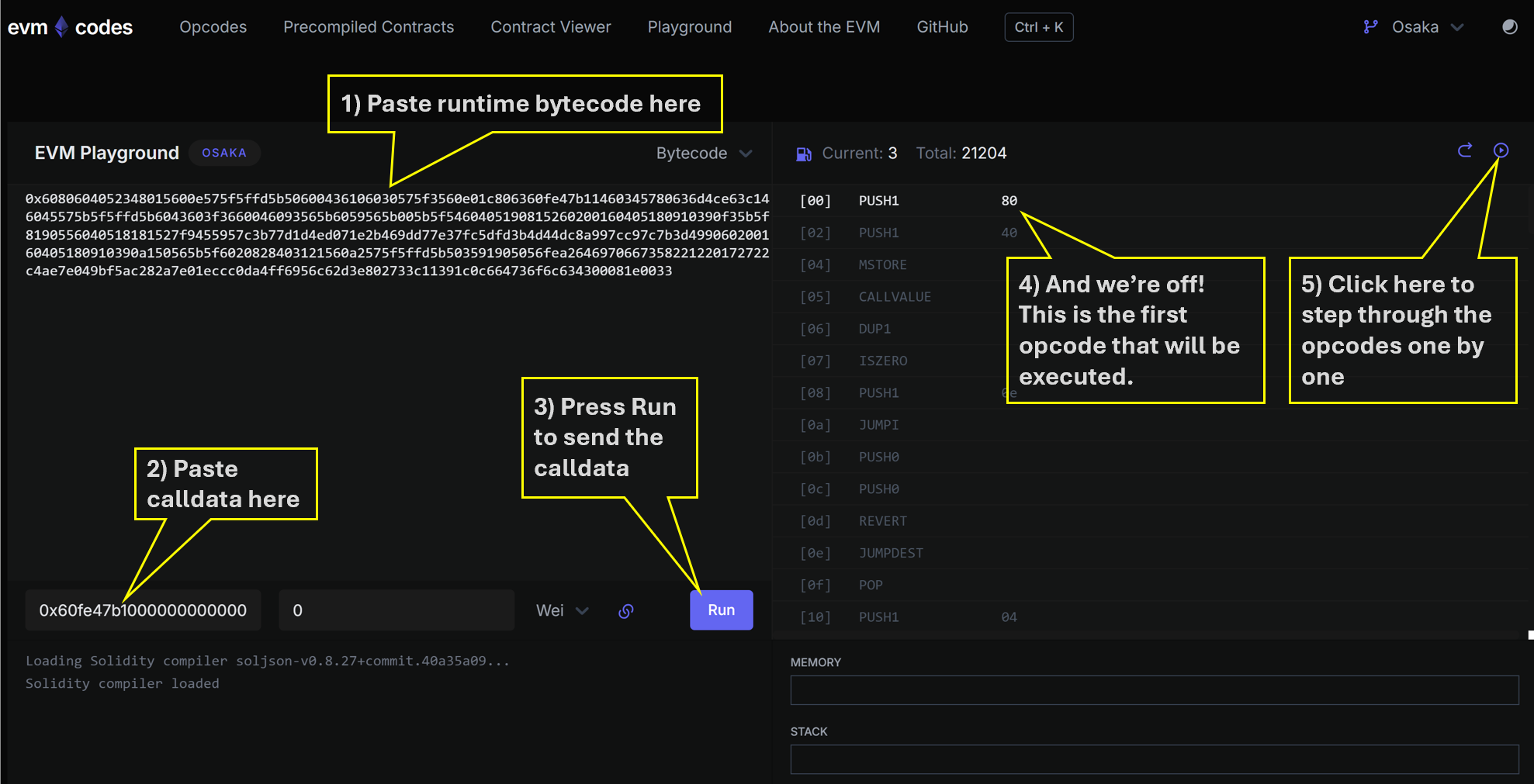
Notice how the playground doesn’t automatically execute the whole transaction. It just brings up the opcode list and lets us step through opcodes one at a time. The playground also keeps a live view of the stack, memory and storage.
2.4 Opcode Reference
The opcodes we will encounter, and what they read and write to the stack, are listed here.
3. Let’s Play at Being an EVM!
If you want to follow along with pen and paper, you can print off this hardcopy opcode listing of the program, ready to annotate by hand. The final bytes in the listing are metadata (compiler version and so on) and are not executable, so we skip them.
3.1 Orientation
-
Number Convention. When we play at being the EVM it makes sense to be using hex natively. The EVM does that, and it saves us a lot of writing of
0x. So in this section and all images, whenever you see a number, mentally prefix it with0x. For example if you see20written, that means0x20which is decimal32d. -
The Program Counter. Abbreviated PC, the program counter is the zero-based hex index of the next operation to be executed, starting at the first byte of bytecode which is PC
00. -
Everything is Stack Based. The EVM uses the stack to store temporary variables and hold the inputs and outputs to opcode operations. The stack can hold 1024d values, each 32d bytes, but only the first 16 or 32 values are currently easily accessible by opcodes1.
3.2 Common Patterns
-
PUSH and POP Operations are common. The
POPopcode just discards the top of the stack. ThePUSH1toPUSH32family of opcodes pushes a value of between 1d and 32d bytes onto the stack, where those byte values follow immediately in the bytecode. You’ll see plenty examples of this in our walkthrough. -
Conditional Control Flow with JUMPI. There is only ONE conditional control flow opcode and that is
JUMPI. Any higher level language constructs like if statements or looping are compiled into patterns of opcodes withJUMPI. TheJUMPIopcode pops two values from the stack, the first is the jump destination, which is an absolute program counter index (PC). The second value is the conditional value to be checked. If that second value is non-zero, then we jump to the destination, otherwise we continue to the next opcode. We can think ofJUMPIas “jump if true”, where zero means false and non-zero means true.
3.3 Let’s Go!
Here’s the recipe we need to follow:
- Look at byte of current PC. Example: PC
00has the byte60. Remember we’re all in hex now. - Translate byte to its opcode mnemonic. Example:
60meansPUSH1. Use our earlier opcode reference to help here. - Perform that operation. Example: for
PUSH1we must read the byte at the next PC and push it to the stack. PC01has value80so that value80gets pushed to the top of the stack. Again, use the opcode reference to see what to do. - Increment PC and go to step 1.
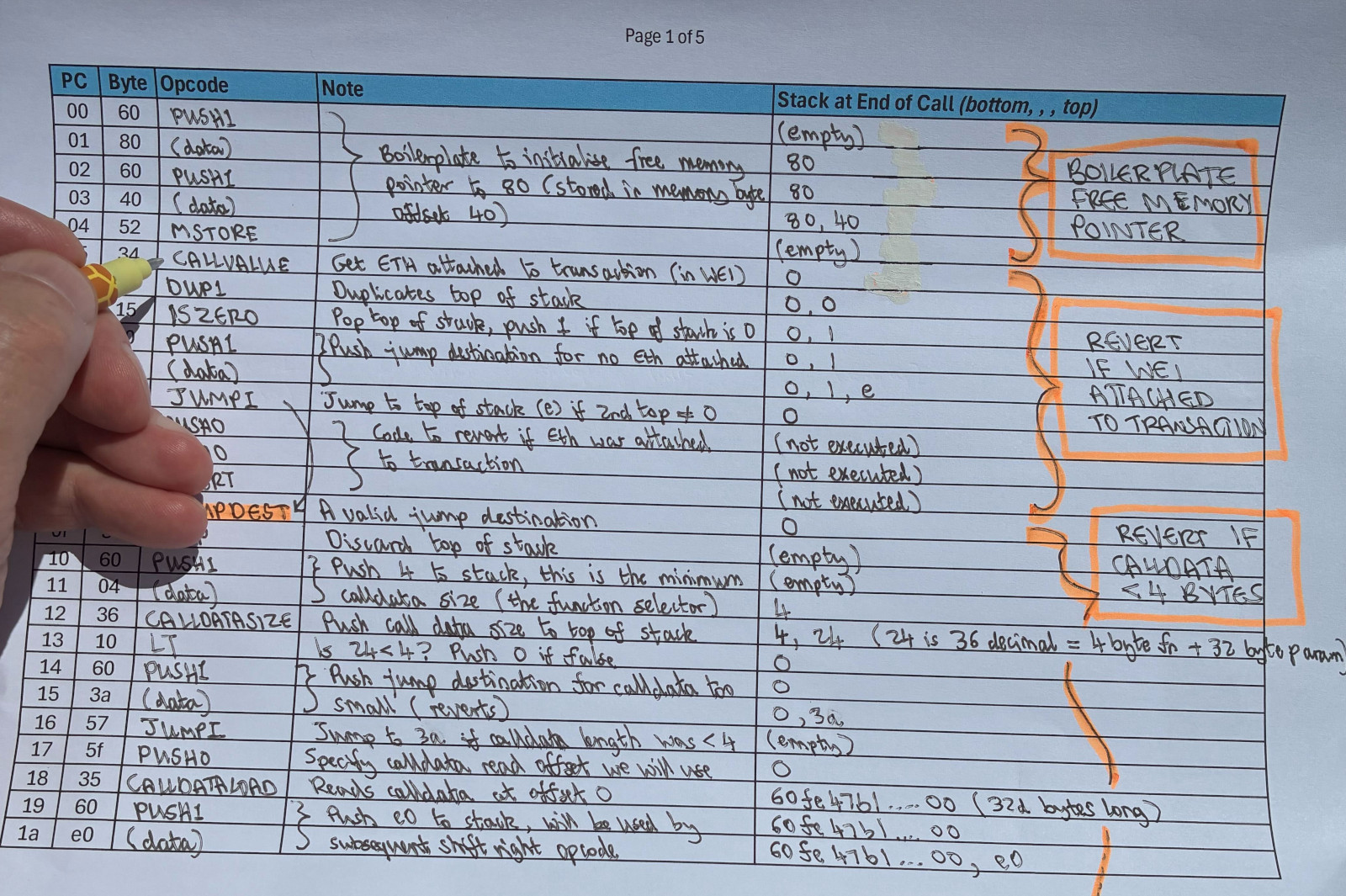
A critical part is to keep the stack accurately recorded, and there is a dedicated stack column in the hardcopy opcode listing. Following the above recipe for the first few PCs you should be ending up with something like this:
4. Notable Opcode Blocks
4.1 Free Memory Pointer Initialisation
The first 3 opcodes set up the free memory pointer.
[00] PUSH1 80    <-- push 80 to stack
[02] PUSH1 40    <-- push 40 to stack
[04] MSTORE      <-- store 80 at memory position 40
The EVM has a temporary memory area, separate from persistent storage, that contracts use during execution. By convention, memory position 40 holds a pointer to where free memory starts. The compiler sets it to 80, leaving the first 128d bytes reserved for special purposes like hashing.
4.2 Checking for Value Sent
[05] CALLVALUE   <-- get ETH sent with this call
[06] DUP1        <-- duplicate it
[07] ISZERO      <-- is it zero?
[08] PUSH1 0e    <-- push jump destination 0e
[0a] JUMPI       <-- jump past the revert if zero (good path)
[0b] PUSH0       <-- revert data offset
[0c] PUSH0       <-- revert data length
[0d] REVERT      <-- reject the transaction
None of our functions are payable, so any ETH sent with the call has to be rejected. CALLVALUE gives us the amount. Zero means we jump to 0e and carry on. Anything else hits REVERT and the transaction is rejected.
Worth noting the PUSH0 opcode (5f) here. Introduced in EIP-3855, it is a cheaper alternative to PUSH1 00 for pushing zero onto the stack.
4.3 The Jump Table (Function Dispatcher)
The jump table figures out which function to call. It starts by checking we have at least 4d bytes of calldata (enough to hold a function selector).
[0e] JUMPDEST
[0f] POP              <-- clean up from callvalue check
[10] PUSH1 04         <-- minimum 4d bytes needed
[12] CALLDATASIZE     <-- how many bytes did we get?
[13] LT               <-- fewer than 4d?
[14] PUSH1 3a         <-- revert destination
[16] JUMPI            <-- jump to revert if too small
Then it extracts the function selector from the first 4d bytes of calldata.
[17] PUSH0            <-- load from position 0
[18] CALLDATALOAD     <-- load first 32d bytes of calldata
[19] PUSH1 e0         <-- 224d bits
[1b] SHR              <-- shift right 224d bits, leaving the first 4d bytes
Then it compares the selector against each known function in turn.
[1c] DUP1
[1d] PUSH4 2a1afcd9   <-- storedData() selector
[22] EQ
[23] PUSH1 3e
[25] JUMPI            <-- jump to storedData() if match
[26] DUP1
[27] PUSH4 60fe47b1   <-- set(uint256) selector
[2c] EQ
[2d] PUSH1 57
[2f] JUMPI            <-- jump to set() if match
[30] DUP1
[31] PUSH4 6d4ce63c   <-- get() selector
[36] EQ
[37] PUSH1 68
[39] JUMPI            <-- jump to get() if match
[3a] JUMPDEST
[3b] PUSH0
[3c] PUSH0
[3d] REVERT           <-- no match, revert
The selectors are checked in ascending numerical order (2a..., 60..., 6d...). As I covered in an earlier post, whichever function is matched first costs slightly less gas to call.
4.4 The set() Function
The set() function implementation lives at PC 57. Before jumping to the calldata decoder, the compiler pushes the return addresses it will need later onto the stack.
[57] JUMPDEST
[58] PUSH1 66         <-- final return destination (after set completes)
[5a] PUSH1 62         <-- where the decoder should return to
[5c] CALLDATASIZE     <-- calldata size
[5d] PUSH1 04         <-- offset past the 4d-byte selector
[5f] PUSH1 6e         <-- calldata decoder address
[61] JUMP             <-- jump to decoder
The decoder (covered below) validates and extracts the uint256 parameter, then jumps back to 62.
[62] JUMPDEST         <-- decoder returns here, value is on the stack
[63] PUSH0            <-- storage slot 0
[64] SSTORE           <-- write value to storage
[65] JUMP             <-- jump to 66
[66] JUMPDEST         <-- valid jump destination
[67] STOP             <-- we are done, execution is completed successfully
SSTORE at PC 64 is doing all the real work. Everything else is scaffolding.
4.5 The Calldata Decoder
The decoder at PC 6e validates that at least 32d bytes of parameter data are present, then loads and returns the value to the caller.
[6e] JUMPDEST
[6f] PUSH0
[70] PUSH1 20         <-- expect 32d bytes of parameter data
[72] DUP3             <-- calldata size
[73] DUP5             <-- calldata offset
[74] SUB              <-- actual bytes available for params
[75] SLT              <-- signed less than 32d?
[76] ISZERO
[77] PUSH1 7d
[79] JUMPI            <-- jump to 7d if ok, fall through to revert if not
[7a] PUSH0
[7b] PUSH0
[7c] REVERT
[7d] JUMPDEST
[7e] POP
[7f] CALLDATALOAD     <-- load the uint256
[80] SWAP2            <-- tidy up stack
[81] SWAP1
[82] POP
[83] JUMP             <-- return to caller
Signed comparison (SLT) is deliberate here. A malformed calldata offset could produce a negative result from the subtraction, and SLT catches that where unsigned LT would not.
5. Wrap up
So there you have it. Our super simple contract turned into dozens of opcodes once compiled:
- Free memory pointer setup — initialising the EVM memory system
- Payability check — rejecting ETH if functions aren’t payable
- Function dispatcher — matching function selectors and jumping to implementations
- Parameter decoding — extracting and validating calldata
- The actual logic — one
SSTORE
The compiler does lots of work to turn our high-level Solidity into safe, functional EVM bytecode. Understanding what’s happening under the hood helps you write more efficient contracts and makes debugging a lot easier when things go wrong.
5.1 Further work
You can experiment with this yourself by changing the SimpleStorage contract and seeing how the opcodes change. Try adding an event, or making a function payable, or making a call to an external contract. Each change will show you more about how the compiler works.
Making a call to an external function has a significant impact. When a call is made to an external contract, a new “call frame” is created, with a clean new stack, new memory, yet storage remains shared (remember it is keyed on contract and slot number). Perhaps this is something for a future article.
Footnotes
-
This is why we sometimes see “stack too deep” errors when compiling large functions. The cause is usually not because the stack has filled up (because it can hold 1024 values) but because the opcodes can’t reach far enough to easily “get at” deeper values. For example, the
SWAPopcodes only go as far asSWAP16and can’t easily reach deeper in the stack. A compiler can work around that by spilling to memory to access deeper stack values, leading to more complex bytecode. ↩